Showing posts with label SCOrch. Show all posts

Thursday, November 17, 2016

OpsMgr (SCOM) - Maintenance Web-Portal (Beta version is here!)

As mentioned here I've decided to develop a web based interface to manage scheduled maintenance mode for SCOM Objects.

And finally, i came up with a first beta version of it.
I promise that as soon as possible I'll be releasing it here - i'm just cleaning up code and giving a more exhaust testing before i give this to you all.
I hope until next week I'm making this available.

So far, the specifications/functionalities of it are:

Search objects of classes Windows and Unix/Linux servers;
Set two types of maintenance mode :
- From now until 'x' minutes;
- From a specific date until 'x' minutes;
Check for the latest maintenance history of searched objects (agents);

1 ) Searching for agents/objects

It shows you the result and give you the possibility to Manage (Set-up maintenance mode for searched object) and to check on maintenance history (History button).


2 ) Manage button to setup Maintenance

Here you can either setup a 'right-now' maintenance or scheduled it in the future.
I'm using this Orchestrator Runbook solution I've developed a few months ago to handle future maintenance.


This is the the way you select your future start-time


Fill the information and Submit it!


You will get different outputs on success or failure!


And ... the result :


As you can see ...


3) History button

Since you click it you'll be given a pop-up with the latest maintenance information like bellow


And this is it! I hope you enjoy the idea and what came out of it, hope you could give me any suggestions and feedback about it.

Now what i would like to do in the future of it.

Further specifications/functionalities i would like to develop:

Windows authentication instead of SDK user in web.config file;
- At this point it's much easier to work like this, but it's of course more reliable to only have access to the objects you manage;
Edit maintenance mode:
- Able to stop current maintenance mode;
- Able to increase the end time of current maintenance mode;
Give the end-user the ability to choose specific classes of objects (SQL Databases, Clusters ...);
On main page give some stats about SCOM and SCOMDW performance in graphs;
(Any other feature I'm missing and you could give me the idea instead!)

Cheers!

Tuesday, November 15, 2016

[Update II] OpsMgr (SCOM) - Operations Manager Maintenance Web-Portal

Keeping this up to date.

Started to do this :


From now on, i'll be developing the scheduled part of the solution - as mentioned before, this will integrate with my previous solution (Orchestrator Runbook and a simple SQL Database)

I've already studied on how i'm passing the windows authentication and will be on my further to-do list.

Cheers,

[Update] OpsMgr (SCOM) - Operations Manager Maintenance Web-Portal

Since last post about the Operations Manager Maintenance Web-Portal, I've been editing code so i could publish the solution, and getting new functions to it.

This is getting a beta version! :)

So far:
- Added the SDK user credentials to Web.Config file;
- Created the Object Maintenance Mode History functionality;
- You can now search objects of classes instead of agents - still figuring out the best way to give user the possibility to choose or to limit class scope;

History button :


Details view


To do :
- User scope - still didn't think about it!
- Future Maintenance (I'll use this Orchestrator Runbook to do the job later!) - the layout is done, code is missing!


Friday, November 11, 2016

OpsMgr (SCOM) - Operations Manager Maintenance Web-Portal

I'll be introducing this post with a disclaimer - I'm not a programmer! Still, i'm an enthusiast about learning and have crazy ideas to occupy my time! :)

I've decided to develop a web-portal (asp/c#) so we could use a web page to put our servers into maintenance mode without having the need to open Operations Manager console - I'll be enhancing this project with other "tasks" that could fit in it - any suggestions, feel free to share!

So ... I came up with this :

1 ) Searching for agent


2 ) Click Manage to setup Maintenance


The future is already designed (missing back code to handle!)


3 ) Settings and Submit!


4) You will get different outputs on success or failure!


And ... the result :


As you can see ...


Further things to do on this project :
- Have a login page so we could have different server scopes - different users see/manage their own servers;
- Future Maintenance (I'll use this Orchestrator Runbook to do the job later!) - the layout is done, code is missing!
- Search for other classes, instead of agents (I'm evaluating the best way to do it!)
- I'll provide the solution to everyone, just finishing to edit and put the code better!

This is a Alpha version, but, as soon as possible i'll be releasing a beta version so you could test on your own environment - until that any suggestions are very welcome!

Hope you enjoy!

Thursday, August 25, 2016

SCCM (ConfigMgr) ADR Maintenance Mode in SCOM (Powershell and SCOrch)

One thing we all miss in SCCM, is the fact of the option "Disable Operations Manager alerts while software updates run" doesn't really disable all the alarmistic for a OpsMgr agent, specially if reboot is needed, and of course it'll cause alarms on the agent being updated.

After some googling i didn't find any solution to put ADR Collection Members into Maintenance in OpsMgr, i started to code some powershell.

If you might remember my later post about "OpsMgr (SCOM) - Schedule Maintenance Mode" i used the same idea to put collection members into maintenance mode.

So before the powershell script that gives me all the ADR Collection Members i had to made some changes into my OpsMgr_MM database.
I've added a new collumn "ADR_ID".

To add it just run the following SQL query :

 ALTER TABLE Scheduling  
 ADD ADR_ID varchar(100);  

Also changed the runbook powershell script that puts the agents into maintenance to this :

 try{  
   [System.Reflection.Assembly]::LoadWithPartialName("Microsoft.EnterpriseManagement.OperationsManager.Common") | Out-Null  
   [System.Reflection.Assembly]::LoadWithPartialName('Microsoft.EnterpriseManagement.Core') | Out-Null  
   [System.Reflection.Assembly]::LoadWithPartialName('Microsoft.EnterpriseManagement.OperationsManager') | Out-Null  
   [System.Reflection.Assembly]::LoadWithPartialName('Microsoft.EnterpriseManagement.Runtime') | Out-Null  
 } Catch { "" }  
 $script:SQLServer = "" # Your SQL Server  
 $script:SQLDBName = "OpsMgr_MM"  # Your Database
 $script:connString = "Data Source=$SQLServer;Initial Catalog=$SQLDBName;Integrated Security = True"  
 $script:connection = New-Object System.Data.SqlClient.SqlConnection($connString)  
 $script:Reason = [Microsoft.EnterpriseManagement.Monitoring.MaintenanceModeReason]::PlannedOther  
 $script:Transversal = [Microsoft.EnterpriseManagement.Common.TraversalDepth]::Recursive  
 $Script:log = "--------"  
 $script:class = ""  
 $script:ClassInstance = ""  
 $script:table = ""  
 # Connection to OpsMgr Management Group  
 try{  
   $MGConnSetting = New-Object Microsoft.EnterpriseManagement.ManagementGroupConnectionSettings('Your_SCOM_SERVER')  
   $MG = New-Object Microsoft.EnterpriseManagement.ManagementGroup($MGConnSetting)  
 } Catch { ' ' }  
 Function SqlDataManagement {
    param($QueryType)
    Try { 
        $connection.Open()
    } Catch {
     $Script:log += "Cannot Open DB Connection"
     exit
    } # Open Database Connection 
    $sqlcmd = $connection.CreateCommand()
    If ($QueryType -eq 'update') {
        $SqlQuery = "UPDATE Scheduling SET Status = 'Processed' WHERE ID = $ID"
        $sqlcmd.CommandText = $SqlQuery
        $results = $sqlcmd.ExecuteNonQuery()
    } # Update Database
    If ($QueryType -eq 'update_not_found') {
        $SqlQuery = "UPDATE Scheduling SET Status = 'CI NOT FOUND' WHERE ID = $ID"
        $sqlcmd.CommandText = $SqlQuery
        $results = $sqlcmd.ExecuteNonQuery()
    } # Update Database
    If ($QueryType -eq 'select') {
        $SqlQuery = "SELECT * FROM Scheduling WHERE Status = 'Not Processed' AND DATEDIFF(MINUTE,GETDATE(),[StartTime]) BETWEEN -1 AND 0 AND DATEDIFF(MINUTE,[StartTime],[EndTime]) > 5"
        $sqlcmd.CommandText = $SqlQuery
        $results = $sqlcmd.ExecuteReader()
        $script:table = new-object “System.Data.DataTable”
        $script:table.Load($results)
    } # Select rows to manage
    $connection.Close()
}

Function Get-SCOMObjectbyClass([string]$ClassDisplayName,[string]$CI) {
    $script:ClassCriteria = New-Object Microsoft.EnterpriseManagement.Configuration.MonitoringClassCriteria("Name = '$ClassDisplayName'")
    $script:MonitoringClass = $MG.GetMonitoringClasses($ClassCriteria)
    $script:MOCriteria = New-Object Microsoft.EnterpriseManagement.Monitoring.MonitoringObjectGenericCriteria("DisplayName LIKE '$CI%'")
    Try {
        $script:ClassInstance = ($MG.GetMonitoringObjects($MOCriteria, $MonitoringClass[0]))[0]
    } Catch { 
        $Script:log += "$CI not found or not belonging to $ClassDisplayName"
      }
}

Function Send-Email([string]$Status) { #Mail & HTML Stuff
    $Head = ""
    $Image = "C:\OpsMgr\MM\images\logo_detail.png"
    $att1 = new-object Net.Mail.Attachment($Image)
    $att1.ContentType.MediaType = “image/png”
    $att1.ContentId = “Attachment”
    $att1.ContentDisposition.Inline = $true
    $att1.ContentDisposition.DispositionType = “Inline”
    $body = "<img src='cid:Attachment' height='12%' width='12%'/><br/>"  
    $body += "<center><h5 style=color:#999999>SCOM - Schedule Maintenance Mode</center></h5>"
    If ( $Status -eq "OK" ) {
        $body += "CI       - $CI 
" $body += "Inicio - $StartTime
" $body += "Fim - $EndTime
" $body += "Razão - $Comment
" } ElseIf ( $Status -eq "NOT OK" ) { $body += "CI - $CI
" $body += "" $body += "Putting $CI in MM failed" $body += "Reason:
" $body += "" $body += "$LOG" } $smtpServer = "SMTP.SERVER" $smtpFrom = "FROM@ADDRESS.COM" $smtpTo = "TO@ADDRESS.COM" $messageSubject = "SCOM-ScheduleMaintenanceMode - $CI" $message = New-Object System.Net.Mail.MailMessage $smtpfrom, $smtpto $message.Subject = $messageSubject $message.IsBodyHTML = $true $message.Attachments.Add($att1) $message.Body = ConvertTo-Html -Body $body -Head $head $smtp = New-Object Net.Mail.SmtpClient($smtpServer) $smtp.Send($message) } SqlDataManagement -QueryType select foreach ( $i in $table ) { $script:StartTime = (Get-Date -date ($i.StartTime).ToString()).ToUniversalTime() $script:EndTime = ($StartTime.AddMinutes(($i.EndTime - $StartTime).TotalMinutes)).ToUniversalTime() $script:Comment = $i.Comment $script:ID = $i.ID $script:Team = $i.Team $script:Type = $i.Type $script:CI = $i.CI switch ( $Type ) { "NetworkDevice" { $script:Class = 'System.NetworkManagement.Node' } "Computer" { $script:Class = 'System.Computer' } } # Switch to check which object class type it is | Add many as you may like or need. Get-SCOMObjectbyClass -ClassDisplayName "$script:Class" -CI $script:CI If ( $ClassInstance -ne $null -and ($ClassInstance.InMaintenanceMode) -ne $true ) { try { $ClassInstance.ScheduleMaintenanceMode($StartTime,$EndTime,$Reason,$Comment,$Transversal) $ClassInstance = ($MG.GetMonitoringObjects($MOCriteria, $MonitoringClass[0]))[0] If ( $ClassInstance.InMaintenanceMode -eq $true ) { SqlDataManagement -QueryType update Send-Email -Status "OK" } Else { $Script:log += = "Failed to put $CI in MM." Send-Email -Status "NOT OK" } } # Object in Maintenance Mode Catch { $Script:log += "Exception while putting $CI in MM :" + "$_.Exception.Message" Send-Email -Status "NOT OK" } } Else { $Script:log += "ClassInstance ($ClassInstance) Not Found or already in Maintenance" SqlDataManagement -QueryType update_not_found Send-Email -Status "NOT OK" } } $SCOrchLog = $script:log

The changes are :
- Function "SqlDataManagement" now accepts 'update_not_found' parameter for not found agents in OpsMgr
- Function "Get-SCOMObjectbyClass" now makes the criteria LIKE instead of = (SCCM agents are listed as HOSTNAME instead of the FQDN)
- If the agent is not found it also let you know sending you an e-mail.

So, since we've got it all done before running our new PS1 script, the script it self :

 Import-Module "D:\Program Files\Microsoft Configuration Manager\AdminConsole\bin\ConfigurationManager.psd1"  
 cd SITE_CODE:  
 $logFile = 'Your Path to SCCM_MM.log'  
 $MaintenanceWindowMode = 'Collection'  
 $SQLServer = "" #Your Server    
 $SQLDBName = "OpsMgr_MM" #YourDBName   
 $LimitDate = Get-Date  
 $AutoDeployRules = @()  
 Foreach ( $ADR in (Get-CMAutoDeploymentRule -Fast )) {   
   $ADRSchedule = (Convert-CMSchedule ($ADR.Schedule) | Select StartTime).StartTime  
   If ( $ADRSchedule -ge $LimitDate -and $ADR.LastRunTime -le $LimitDate) {  
     $AutoDeployRules += $ADR  
   }  
   Else { $ADR.Name + ' not reliable to Maintenance - Maintenance Window is in the past!' >> $logFile }  
 }  
 Foreach ( $ValidADR in $AutoDeployRules ) {  
   #ADR Info ----> SELECT NAME, Schedule  
   $ADRID = ($ValidADR.UniqueIdentifier).Guid  
   $ADRMaintenanceStart = (Convert-CMSchedule $ValidADR.Schedule).StartTime  
   $ADRName = $ValidADR.Name  
   # Check if ADR is already in Maintenance Mode Database #  
   $connString = "Data Source=$SQLServer;Initial Catalog=$SQLDBName;Integrated Security = True"   
   $connection = New-Object System.Data.SqlClient.SqlConnection($connString)    
   $connection.Open()   
   $sqlcmd = $connection.CreateCommand()    
   $SqlQuery = "set dateformat dmy ; SELECT * FROM Scheduling WHERE ADR_ID = '$ADRID' AND [StartTime] != '$(Get-Date $ADRMaintenanceStart -Format g)' ;"   
   $sqlcmd.CommandText = $SqlQuery    
   $result = $sqlcmd.ExecuteReader()  
   If ( $result.HasRows -eq $False ) {   
     If ( $MaintenanceWindowMode = "ADR" ) {  
       # <Duration>1</Duration><DurationUnits>Hours</DurationUnits>  
       [xml]$ADRDeploymentTemplate = $ValidADR.DeploymentTemplate  
       [Int32]$ADRDuration = $ADRDeploymentTemplate.DeploymentCreationActionXML.Duration  
       $ADRDurationUnits = $ADRDeploymentTemplate.DeploymentCreationActionXML.DurationUnits  
       # ADR Stop Maintenance Calculation  
       Switch ($ADRDurationUnits){  
         Hours { $ADRMaintenanceStop = (Get-Date $ADRMaintenanceStart).AddHours($ADRDuration) ; break }  
         Days { $ADRMaintenanceStop = (Get-Date $ADRMaintenanceStart).AddDays($ADRDuration) ; break}  
         Weeks { $ADRMaintenanceStop = (Get-Date $ADRMaintenanceStart).AddDays( $ADRDuration * 7 ) ; break}  
         Months { $ADRMaintenanceStop = (Get-Date $ADRMaintenanceStart).AddMonths($ADRDuration) ; break}  
        }  
     }  
     If ( $MaintenanceWindowMode = "Collection" ) {  
      $ADRMaintenanceStop = (Get-Date $ADRMaintenanceStart).AddMinutes(((Get-CMCollectionSetting -CollectionId $ValidADR.CollectionID | select -ExpandProperty ServiceWindows | select Duration).Duration))  
     }  
     # ADR Collection Members Info  
     $ADRCollectionName = (Get-CMCollection -Id $ValidADR.CollectionID).Name  
     $ADRCollectionMembers = Get-CMCollectionMember -CollectionId $ValidADR.CollectionID  
     Foreach ( $CMDeviceMember in $ADRCollectionMembers ) {  
       $CMDevice = $CMDeviceMember.Name   
       $connString = "Data Source=$SQLServer;Initial Catalog=$SQLDBName;Integrated Security = True"   
       $connection = New-Object System.Data.SqlClient.SqlConnection($connString)    
       $connection.Open()   
       $sqlcmd = $connection.CreateCommand()    
       $SqlQuery = "set dateformat dmy ; INSERT INTO Scheduling (ci,type,Team,StartTime,EndTime,Comment,Status,ADR_ID) VALUES ( '$CMDevice', 'Computer', 'SCCM', '$(Get-Date $ADRMaintenanceStart -Format g)', '$(Get-Date $ADRMaintenanceStop -Format g)', 'SCCM MaintenanceMode for : $ADRCollectionName | $ADRName' , 'NOT PROCESSED', '$ADRID');"   
       $sqlcmd.CommandText = $SqlQuery    
       $result = $sqlcmd.ExecuteNonQuery()  
     }  
   } Else { $ADRName + ' already in MM Database' >> $logFile }  
 }  

Now, you just need to create a scheduled task in your SCCM server to run whenever you might like, and ... :

# The Scheduled Task :


# OpsMgr Console Maintenance Mode window :


And that's it!

If you bump into some error or bug, please let me know, this is just too fresh and made just some few tests.

Cheers,

Thursday, July 14, 2016

C# - First steps (Orchestrator Web-Service!)

First of all, i'm no developer - at all - and i thought that it would be easier to adapt since i (thought) have some powershell skills! (ahahahah)

So, for my first C# project i thought that i could play a little bit with the Orchestrator web-service and manage, list, start (and so on...) some runbooks - well, we all hate the silverlight thing!

This is what i achieved :


The icons with the start,pause,stop and restart functions, are not working (yet!) - that's the next fase!

I'll share the project soon on GitHUB and let you all know.

Cheers,

Friday, May 13, 2016

Nagios/Check_MK Alerts to SCOM (OpsMgr) using Orchestrator

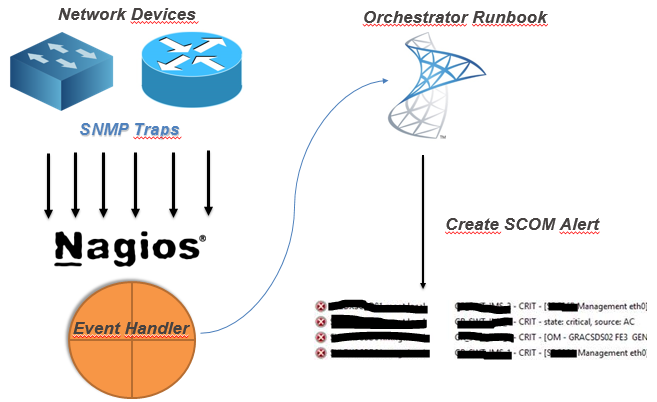
Recently a customer needed to process 'tons' of snmp traps from several equipments, from several vendors, and some, snmp v3 traps, these not supported by OpsMgr. But still forward those alerts to Operations Manager.
So, i built a Nagios server! Yes Nagios! Nagios, no matter what, can and it's usefull.
And it's helping us a lot.
I decided to go for what i like the most - OMD (omdistro.com), so this is made specific for Check_MK configuration, but you can 'port' it to Nagios Core.

So. Nagios installed, lot's of equipment configured, snmpd configured, mibs copied, and tons of traps received, problem solved!
Now, forward those alerts to SCOM!

My idea (and working idea!) :

(yes, this was the powerpoint i sent to the customer! - hahah!)


So, after you've your monitoring criteria in Nagios configured, you need to :
  1. Create a Orchestrator Runbook that receives some parameters
  2. Create Nagios Event-Handler to 'consume' that runbook by orchestrator web-service


So, my Orchestrator Runbook :


Details about the MKAlertInput :


Create Alert details :


So, since i've got my runbook, i need to make a bash script to consume orchestrator runbook.
But, first, you need to know :
Your new runbook ID
And your runbook parameters ID
How ? Simple !
Connect to your MSSQL Server (Orchestrator BD) and run this :

 -- Runbook ID
 SELECT   
 Name as 'Runbook Name',  
 LOWER(ID) as 'Runbook ID'  
 FROM [Orchestrator].[Microsoft.SystemCenter.Orchestrator].[Runbooks]  
 -- Parameters ID
 SELECT LOWER(Parameters.Id) , Parameters.Name  
 FROM [Orchestrator].[Microsoft.SystemCenter.Orchestrator].[RunbookParameters] AS Parameters  
 INNER JOIN [Orchestrator].[Microsoft.SystemCenter.Orchestrator].[Runbooks] Runbooks ON Parameters.RunbookId = Runbooks.Id  
 -- THIS ID Showld be the one from the first query!  
 WHERE Runbooks.Id = '0B3E5FA3-A2E9-4337-BC63-050FC347A908'   

Since you got the ID's you need, you need to create your Nagios Event Handler, so every time you've na alert you can handle it and forward it to SCOM.


So, my script (for this scenario!)
 #!/bin/sh  
 # Nagios input data into vars#  
 host_name="$1"  
 description="$3"  
 plugin_output="$3 | $4 @ $5"  
 last_state_change=`date +"%d-%m-%Y %T"`  
 servicestate="$2"  
 # Orchestrator Info #  
 url='http://ORCHSERVER:81/Orchestrator2012/Orchestrator.svc/Jobs/'  
 user='DOMAIN\ORCHUSER'  
 password='ORCHPASSWORD'  
 case "$servicestate" in  
     OK)  
         echo ""  
     ;;  
     WARNING)  
         echo ""  
     ;;  
     CRITICAL)  
         xml="<?xml version=\"1.0\" encoding=\"utf-8\" standalone=\"yes\"?><entry xmlns:d=\"http://schemas.microsoft.com/ado/2007/08/dataservices\" xmlns:m=\"http://schemas.microsoft.com/ado/2007/08/dataservices/metadata\" xmlns=\"http://www.w3.org/2005/Atom\"><content type=\"application/xml\"><m:properties><d:Parameters>&lt;Data&gt;&lt;Parameter&gt;&lt;Name&gt;host_name&lt;/Name&gt;&lt;ID&gt;{c2555c8a-4c1c-4c04-a175-d27ccb27aeb3}&lt;/ID&gt;&lt;Value&gt;$host_name&lt;/Value&gt;&lt;/Parameter&gt;&lt;Parameter&gt;&lt;Name&gt;description&lt;/Name&gt;&lt;ID&gt;{e47406b6-fbd7-4bc5-b7a5-a1216f4fdfe5}&lt;/ID&gt;&lt;Value&gt;$description&lt;/Value&gt;&lt;/Parameter&gt;&lt;Parameter&gt;&lt;Name&gt;plugin_output&lt;/Name&gt;&lt;ID&gt;{406620e8-5fc0-4318-ad6b-987d9d491b09}&lt;/ID&gt;&lt;Value&gt;$plugin_output&lt;/Value&gt;&lt;/Parameter&gt;&lt;Parameter&gt;&lt;Name&gt;last_state_change&lt;/Name&gt;&lt;ID&gt;{35ab0932-df75-42d0-9715-935d3510b532}&lt;/ID&gt;&lt;Value&gt;$last_state_change&lt;/Value&gt;&lt;/Parameter&gt;&lt;/Data&gt;</d:Parameters><d:RunbookId type=\"Edm.Guid\">0b3e5fa3-a2e9-4337-bc63-050fc347a908</d:RunbookId></m:properties></content></entry>"  
         # XML 2 File  
         xml_file=`< /dev/urandom tr -dc _A-Z-a-z-0-9 | head -c10`  
         echo "$xml" > /tmp/$xml_file  
         # Post data into SCOrch Web-Service  
         curl --ntlm -u $user:$password -H 'Content-Type:application/atom+xml' -d @/tmp/$xml_file -X POST $url  
         ;;  
     UNKNOWN)  
         echo ""  
         ;;  
 esac  

Now, you need to tell nagios to use this script, so paste this config : (Remember, i'm using Check_MK)
 extra_nagios_conf += r"""  
 define command {  
   command_name  scorchws  
   command_line  /omd/sites/nagdsv/gdc/bin/orchestratorws.sh "$HOSTNAME$" "$SERVICESTATE$" "$SERVICEDESC$" "$SERVICEOUTPUT$" "$HOSTGROUPNAMES$"  
 }  
 """  
 extra_service_conf["event_handler"] = [  
   ( "scorchws", ALL_HOSTS, ALL_SERVICES ),  
 ]  
 extra_service_conf["event_handler_enabled"] = [  
   ( "1", ALL_HOSTS, ALL_SERVICES ),  
 ]  

Everything in place … this is what you get in SCOM :

Hope this could be helpful for you :)

Cheers,

Thursday, May 5, 2016

SCOrch (Orchestrator) - Runbook Monitor

I've got a bunch of Orchestrator Runbooks that need to be always running, and sometimes (reboots, or other reasons) those Runbooks maybe stopped.

So i've made this Powershell script to put on schedule tasks or somewhere else (perhaps a Operations Manager monitor - i'll do it later! :) )

The script :

<#
If for some reason you get the following PS error :
    Exception calling "GetResponse" with "0" argument(s): "The remote server returned an error: (400) Bad Request."

    Please log-in into Orchestrator Database and run :

    TRUNCATE TABLE [Microsoft.SystemCenter.Orchestrator.Internal].AuthorizationCache;
    EXEC [Microsoft.SystemCenter.Orchestrator.Maintenance].EnqueueRecurrentTask ‘ClearAuthorizationCache’

#>
 'Starting monitoring ... ' >> C:\Powershell\Log\RunbookManager.log  
 # Runbook names here :)  
 $OpsMgrRunbooks =@('1-Runbook','2-Runbook','3-Any-other-Runbook-Name')  
 $user = 'your_orchestrator_user'  
 $pass = ConvertTo-SecureString 'your_password' -AsPlainText -Force  
 $creds = New-Object System.Management.Automation.PsCredential($user,$pass)  
 foreach ($runbook in $OpsMgrRunbooks) {  
   $url = "http://YOUR_ORCHESTRATOR_SERVER:81/Orchestrator2012/Orchestrator.svc/Jobs()?`$expand=Runbook&`$filter=(Runbook/Name eq '$runbook')&`$select=Runbook/Name,Status"  
   $request = [System.Net.HttpWebRequest]::Create($url)  
   $request.Credentials = $creds  
   $request.Timeout = 120000  
   $request.ContentType = 'application/atom+xml,application/xml'  
   $request.Headers.Add('DataServiceVersion', '2.0;NetFx')  
   $request.Method = 'GET'  
   $response = $request.GetResponse()  
   $requestStream = $response.GetResponseStream()  
   $readStream=new-object System.IO.StreamReader $requestStream  
   $Output = $readStream.ReadToEnd()  
   $readStream.Close()  
   $response.Close()  
   $Output > $env:TEMP\1.log  
   $htmlid = Get-Content -Path $env:TEMP\1.log | Select-String -pattern '<id>.*Runbooks.*'  
   $bookid = ($htmlid -split "'")[1]  
   $status = $Output -match "<d:Status>Running</d:Status>"  
   If ($Status -ne $True) {  
     $request = ''  
     $request = [System.Net.HttpWebRequest]::Create("http://YOUR_ORCHESTRATOR_SERVER:81/Orchestrator2012/Orchestrator.svc/Jobs")  
     $request.Credentials = $creds  
     $request.Method = "POST"  
     $request.UserAgent = "Microsoft ADO.NET Data Services"  
     $request.Accept = "application/atom+xml,application/xml"  
     $request.ContentType = "application/atom+xml"  
     $request.KeepAlive = $true  
     $request.Headers.Add("Accept-Encoding","identity")  
     $request.Headers.Add("Accept-Language","en-US")  
     $request.Headers.Add("DataServiceVersion","1.0;NetFx")  
     $request.Headers.Add("MaxDataServiceVersion","2.0;NetFx")  
     $request.Headers.Add("Pragma","no-cache")  
 $requestBody = @"  
 <?xml version="1.0" encoding="utf-8" standalone="yes"?>  
 <entry xmlns:d="http://schemas.microsoft.com/ado/2007/08/dataservices" xmlns:m="http://schemas.microsoft.com/ado/2007/08/dataservices/metadata" xmlns="http://www.w3.org/2005/Atom">  
   <content type="application/xml">  
     <m:properties>  
       <d:RunbookId m:type="Edm.Guid">$bookid</d:RunbookId>  
     </m:properties>  
   </content>  
 </entry>  
 "@      
     $requestStream = new-object System.IO.StreamWriter $Request.GetRequestStream()  
     $requestStream.Write($RequestBody)  
     $requestStream.Flush()  
     $requestStream.Close()  
     [System.Net.HttpWebResponse]$response=[System.Net.HttpWebResponse] $Request.GetResponse()  
     $responseStream = $Response.GetResponseStream()  
     $readStream = new-object System.IO.StreamReader $responseStream  
     $responseString = $readStream.ReadToEnd()  
     $readStream.Close()  
     $responseStream.Close()  
     if ($response.StatusCode -eq 'Created') {  
       $jobId = ([xml]$responseString).entry.content.properties.Id.InnerText  
       "Successfully started runbook: $rubook. Job ID: $jobId" >> C:\Powershell\Log\RunbookManager.log  
     }  
     else { "Could not start runbook $runbook. Status: $response.StatusCode" >> C:\Powershell\Log\RunbookManager.log }  
   }  
   Else { "Runbook $runbook | $bookid - Already running" >> C:\Powershell\Log\RunbookManager.log }  
 }  

You'll get the following output :

Runbook 1.Runbook_Testing | 6063dfb2-0f86-4b49-bc38-72a9bef9239c - Already running
Runbook 1.2 SCOM Close Alert | 0d51fb6e-0112-4e91-84f1-a713cd5fd1ae - Already running
Runbook 1 - AlertForwarding | 22585473-7906-4ca4-b4e3-121657cb2e42 - Already running
Successfully started runbook. Job ID:  0a1fdc16-dce4-4585-a2a2-a3da273a704e
Successfully started runbook. Job ID:  ee345fc4-f21b-4d05-be8c-c47249ceec36

Hope you find it useful :)

Cheers,