Showing posts with label critical. Show all posts

Friday, May 20, 2016

OpsMgr (SCOM) - Ghost Agents

They show up in Monitoring views, but not in Administration ?
Well ... no problem!

At OperationsManager Database :

 -- #1  
 SELECT * FROM dbo.[BaseManagedEntity] where FullName Like '%Windows.Computer%' and Name = 'your_host_here'  
 -- #2  
 UPDATE dbo.[BaseManagedEntity]  
 SET IsDeleted = 1   
 WHERE FullName Like '%Windows.Computer%' and Name = 'your_host_here'  

Hope it helps you out.

Cheers,

Friday, May 13, 2016

Nagios/Check_MK Alerts to SCOM (OpsMgr) using Orchestrator

Recently a customer needed to process 'tons' of snmp traps from several equipments, from several vendors, and some, snmp v3 traps, these not supported by OpsMgr. But still forward those alerts to Operations Manager.
So, i built a Nagios server! Yes Nagios! Nagios, no matter what, can and it's usefull.
And it's helping us a lot.
I decided to go for what i like the most - OMD (omdistro.com), so this is made specific for Check_MK configuration, but you can 'port' it to Nagios Core.

So. Nagios installed, lot's of equipment configured, snmpd configured, mibs copied, and tons of traps received, problem solved!
Now, forward those alerts to SCOM!

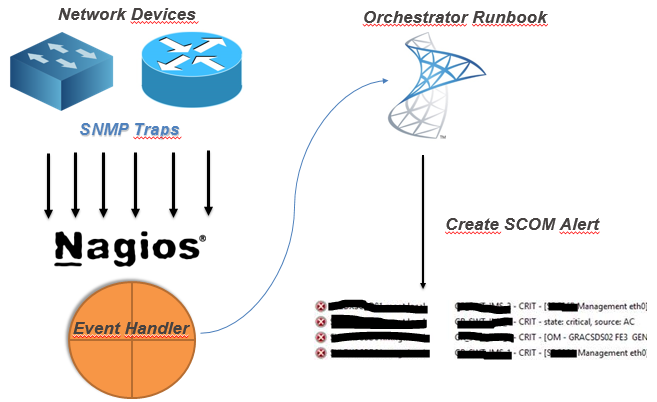
My idea (and working idea!) :

(yes, this was the powerpoint i sent to the customer! - hahah!)


So, after you've your monitoring criteria in Nagios configured, you need to :
  1. Create a Orchestrator Runbook that receives some parameters
  2. Create Nagios Event-Handler to 'consume' that runbook by orchestrator web-service


So, my Orchestrator Runbook :


Details about the MKAlertInput :


Create Alert details :


So, since i've got my runbook, i need to make a bash script to consume orchestrator runbook.
But, first, you need to know :
Your new runbook ID
And your runbook parameters ID
How ? Simple !
Connect to your MSSQL Server (Orchestrator BD) and run this :

 -- Runbook ID
 SELECT   
 Name as 'Runbook Name',  
 LOWER(ID) as 'Runbook ID'  
 FROM [Orchestrator].[Microsoft.SystemCenter.Orchestrator].[Runbooks]  
 -- Parameters ID
 SELECT LOWER(Parameters.Id) , Parameters.Name  
 FROM [Orchestrator].[Microsoft.SystemCenter.Orchestrator].[RunbookParameters] AS Parameters  
 INNER JOIN [Orchestrator].[Microsoft.SystemCenter.Orchestrator].[Runbooks] Runbooks ON Parameters.RunbookId = Runbooks.Id  
 -- THIS ID Showld be the one from the first query!  
 WHERE Runbooks.Id = '0B3E5FA3-A2E9-4337-BC63-050FC347A908'   

Since you got the ID's you need, you need to create your Nagios Event Handler, so every time you've na alert you can handle it and forward it to SCOM.


So, my script (for this scenario!)
 #!/bin/sh  
 # Nagios input data into vars#  
 host_name="$1"  
 description="$3"  
 plugin_output="$3 | $4 @ $5"  
 last_state_change=`date +"%d-%m-%Y %T"`  
 servicestate="$2"  
 # Orchestrator Info #  
 url='http://ORCHSERVER:81/Orchestrator2012/Orchestrator.svc/Jobs/'  
 user='DOMAIN\ORCHUSER'  
 password='ORCHPASSWORD'  
 case "$servicestate" in  
     OK)  
         echo ""  
     ;;  
     WARNING)  
         echo ""  
     ;;  
     CRITICAL)  
         xml="<?xml version=\"1.0\" encoding=\"utf-8\" standalone=\"yes\"?><entry xmlns:d=\"http://schemas.microsoft.com/ado/2007/08/dataservices\" xmlns:m=\"http://schemas.microsoft.com/ado/2007/08/dataservices/metadata\" xmlns=\"http://www.w3.org/2005/Atom\"><content type=\"application/xml\"><m:properties><d:Parameters>&lt;Data&gt;&lt;Parameter&gt;&lt;Name&gt;host_name&lt;/Name&gt;&lt;ID&gt;{c2555c8a-4c1c-4c04-a175-d27ccb27aeb3}&lt;/ID&gt;&lt;Value&gt;$host_name&lt;/Value&gt;&lt;/Parameter&gt;&lt;Parameter&gt;&lt;Name&gt;description&lt;/Name&gt;&lt;ID&gt;{e47406b6-fbd7-4bc5-b7a5-a1216f4fdfe5}&lt;/ID&gt;&lt;Value&gt;$description&lt;/Value&gt;&lt;/Parameter&gt;&lt;Parameter&gt;&lt;Name&gt;plugin_output&lt;/Name&gt;&lt;ID&gt;{406620e8-5fc0-4318-ad6b-987d9d491b09}&lt;/ID&gt;&lt;Value&gt;$plugin_output&lt;/Value&gt;&lt;/Parameter&gt;&lt;Parameter&gt;&lt;Name&gt;last_state_change&lt;/Name&gt;&lt;ID&gt;{35ab0932-df75-42d0-9715-935d3510b532}&lt;/ID&gt;&lt;Value&gt;$last_state_change&lt;/Value&gt;&lt;/Parameter&gt;&lt;/Data&gt;</d:Parameters><d:RunbookId type=\"Edm.Guid\">0b3e5fa3-a2e9-4337-bc63-050fc347a908</d:RunbookId></m:properties></content></entry>"  
         # XML 2 File  
         xml_file=`< /dev/urandom tr -dc _A-Z-a-z-0-9 | head -c10`  
         echo "$xml" > /tmp/$xml_file  
         # Post data into SCOrch Web-Service  
         curl --ntlm -u $user:$password -H 'Content-Type:application/atom+xml' -d @/tmp/$xml_file -X POST $url  
         ;;  
     UNKNOWN)  
         echo ""  
         ;;  
 esac  

Now, you need to tell nagios to use this script, so paste this config : (Remember, i'm using Check_MK)
 extra_nagios_conf += r"""  
 define command {  
   command_name  scorchws  
   command_line  /omd/sites/nagdsv/gdc/bin/orchestratorws.sh "$HOSTNAME$" "$SERVICESTATE$" "$SERVICEDESC$" "$SERVICEOUTPUT$" "$HOSTGROUPNAMES$"  
 }  
 """  
 extra_service_conf["event_handler"] = [  
   ( "scorchws", ALL_HOSTS, ALL_SERVICES ),  
 ]  
 extra_service_conf["event_handler_enabled"] = [  
   ( "1", ALL_HOSTS, ALL_SERVICES ),  
 ]  

Everything in place … this is what you get in SCOM :

Hope this could be helpful for you :)

Cheers,

Monday, April 4, 2016

OpsMgr (SCOM) - Alerts per group SQL Query

A few days ago, i showed up how to get SCOM alerts for a certain group in Powershell.
Now i needed to put it in DataZen and i could, but it's more simple to get data by SQL, so, the query i came up with is this :

 DECLARE @TMP_GROUP_TABLE table(groupname varchar(50));  
 insert into @TMP_GROUP_TABLE   
 values('Group #1'), -- List  
      ('Group #2'), -- Of   
      ('Group #3'), -- Groups   
      ('Group #4'), -- You  
      ('Group #5') -- Want  
 SELECT   
     s.displayName as [Group],   
     CASE WHEN t.Path IS NULL THEN t.DisplayName ELSE t.path END AS [CI],  
     av.AlertName as [Alert Name],  
     av.AlertDescription as [Description],  
     count(av.AlertName) as [AlertCount],  
     ResolutionState, RaisedDateTime,av.Severity  
 FROM vrelationship r   
      inner join vManagedEntity s on s.ManagedEntityRowId = r.SourceManagedEntityRowId   
      inner join vManagedEntity t on t.ManagedEntityRowId = r.TargetManagedEntityRowId   
      inner join Alert.vAlert av on av.ManagedEntityRowId= t.ManagedEntityRowId  
      inner JOIN Alert.vAlertDetail adv on av.AlertGuid =adv.AlertGuid   
      inner JOIN Alert.vAlertResolutionState arsv on av.AlertGuid =arsv.AlertGuid   
      inner JOIN Alert.vAlertParameter apv on av.AlertGuid =apv.AlertGuid   
 WHERE   
      -- I choose 7 days, you can put a value as you like  
      RaisedDateTime >=DATEADD(day,-7,GETDATE())  
      and s.DisplayName IN ( SELECT groupname FROM @TMP_GROUP_TABLE )  
      -- Filter only for CRIT and WARN alarms  
      AND av.Severity >= 1  
 group by s.displayName,t.displayname,av.AlertDescription,ResolutionState,RaisedDateTime,av.Severity,av.AlertName,t.Path  
 order by AlertCount desc  

This is good so you can create a nice Datazen dashboard to keep teams up with their alarms (you can put their objects inside respective groups).

Feel free to criticize, no SQL master at all (lol!)

Friday, March 4, 2016

SCCM - Security and Critical Updates | Datazen Dashboard

Recently i needed to provide customer a dashboard on the missing patches for every machines in the park - and because managers like the fancy datazen dashboards, and i also like the easy way we can build some dashboards - why not ?

First of all, created this datasource in Datazen CP :


 SELECT    dbo.v_R_System.Name0 AS 'Computername', dbo.v_UpdateInfo.Title AS 'Updatename', dbo.v_StateNames.StateName, dbo.v_UpdateInfo.InfoURL,  
         dbo.v_Update_ComplianceStatusAll.LastStatusCheckTime, dbo.v_UpdateInfo.DateLastModified, dbo.v_UpdateInfo.IsDeployed, dbo.v_UpdateInfo.IsSuperseded,   
         dbo.v_UpdateInfo.IsExpired, dbo.v_UpdateInfo.BulletinID, dbo.v_UpdateInfo.ArticleID, dbo.v_UpdateInfo.DateRevised,   
         catinfo.CategoryInstanceName as 'Vendor',  
     catinfo2.CategoryInstanceName as 'UpdateClassification',  
         COUNT(case when catinfo2.CategoryInstanceName like 'Security%' then '1' else NULL end ) IsSecurity,  
         COUNT(case when catinfo2.CategoryInstanceName like 'Critical%' then '1' else NULL end ) IsCritical  
 FROM    dbo.v_StateNames  
         INNER JOIN dbo.v_Update_ComplianceStatusAll  
         INNER JOIN dbo.v_R_System ON dbo.v_R_System.ResourceID = dbo.v_Update_ComplianceStatusAll.ResourceID  
         INNER JOIN dbo.v_UpdateInfo ON dbo.v_UpdateInfo.CI_ID = dbo.v_Update_ComplianceStatusAll.CI_ID ON dbo.v_StateNames.StateID = dbo.v_Update_ComplianceStatusAll.Status  
         INNER JOIN v_CICategories_All catall on catall.CI_ID = dbo.v_UpdateInfo.CI_ID  
         INNER JOIN v_CategoryInfo catinfo on catall.CategoryInstance_UniqueID = catinfo.CategoryInstance_UniqueID and catinfo.CategoryTypeName='Company'  
         INNER JOIN v_CICategories_All catall2 on catall2.CI_ID=dbo.v_UpdateInfo.CI_ID  
         INNER JOIN v_CategoryInfo catinfo2 on catall2.CategoryInstance_UniqueID = catinfo2.CategoryInstance_UniqueID and catinfo2.CategoryTypeName='UpdateClassification'  
 WHERE    (dbo.v_StateNames.TopicType = 500)  
 AND        (dbo.v_StateNames.StateName = 'Update is required')  
 AND        (dbo.v_R_System.Name0 IN   
           (SELECT TOP (100) PERCENT SD.Name0 AS 'Machine Name'  
             FROM    dbo.v_R_System AS SD INNER JOIN  
                     dbo.v_FullCollectionMembership AS FCM ON SD.ResourceID = FCM.ResourceID INNER JOIN  
                     dbo.v_Collection AS COL ON FCM.CollectionID = COL.CollectionID LEFT OUTER JOIN  
                     dbo.v_R_User AS USR ON SD.User_Name0 = USR.User_Name0 INNER JOIN  
                     dbo.v_GS_PC_BIOS AS PCB ON SD.ResourceID = PCB.ResourceID INNER JOIN  
                     dbo.v_GS_COMPUTER_SYSTEM AS CS ON SD.ResourceID = CS.ResourceID INNER JOIN  
                     dbo.v_RA_System_SMSAssignedSites AS SAS ON SD.ResourceID = SAS.ResourceID  
             ))  
 AND        ((catinfo2.CategoryInstanceName like 'Critical%' ) OR (catinfo2.CategoryInstanceName like 'Security%' ))  
 GROUP BY dbo.v_R_System.Name0 , dbo.v_UpdateInfo.Title, dbo.v_StateNames.StateName,   
         dbo.v_Update_ComplianceStatusAll.LastStatusCheckTime, dbo.v_UpdateInfo.DateLastModified, dbo.v_UpdateInfo.IsDeployed, dbo.v_UpdateInfo.IsSuperseded,   
         dbo.v_UpdateInfo.IsExpired, dbo.v_UpdateInfo.BulletinID, dbo.v_UpdateInfo.ArticleID, dbo.v_UpdateInfo.DateRevised,   
         catinfo.CategoryInstanceName, catinfo2.CategoryInstanceName, dbo.v_UpdateInfo.InfoURL  

Then created this dashboard :


The challange now is to make this possible to any group of collection we might want to.

I made a post about it ... give it a try:

http://itopstuff.blogspot.pt/2015/11/sccm-missing-updates-per-collection.html

:)