Showing posts with label runbook. Show all posts

Monday, August 8, 2016

Powershell - SCOM (OpsMgr) Distributed Application to SCCM (ConfigMgr) Collection

For reporting purposes i had to create equal SCCM collections with the same members that i had in SCOM Distributed Applications.
Now that i have same DA as Collections, and respective members, i can match alerts (DA from SCOM), as well i can have a list of required updates (Collection from SCCM) in the same PowerBI report.
It can be really useful for Application Owners or Sys Admin teams.

Instead of creating by hand every DA I've in SCCM as a collection, and since i've got around 60 DA's, i came up with this script!
(Sorry for the variable names, and for some bad code - not having the time i need to get it better!)
(PS: Read the comments before you run the script! :) )

 Import-Module OperationsManager  
 # Your SCCM Server  
 $SCCMServer = 'Your SCCM Server'  
 $Class = Get-SCOMClass -DisplayName 'User Created Distributed Application'  
 $DistrApps = Get-SCOMClassInstance -Class $Class  
 $DARelationList = ''  
 $ListaDAandHosts = @()  
 Foreach ($DA in $DistrApps) {  
   $DAHosts = ($DA | % {$_.GetRelatedMonitoringObjects()} | % {$_.GetRelatedMonitoringObjects()}).DisplayName  
   Foreach ($Hostz in $DAHosts) {  
     $ListaDAandHosts += $DA.DisplayName + ';' + ($Hostz -split '\.')[0]  
   }  
 }  
 #This is because i only want DA with valid hostnames!  
 $RegexQuery=[regex]"^[0-9A-Za-z].*;(?=.{1,255}$)[0-9A-Za-z](?:(?:[0-9A-Za-z]|-){0,61}[0-9A-Za-z])?(?:\.[0-9A-Za-z](?:(?:[0-9A-Za-z]|-){0,61}[0-9A-Za-z])?)*\.?$"  
 $ListaDA = @()  
 $ListaDA += 'DA;ServerFQDN'  
 Foreach ($line in $ListaDAandHosts) {  
   If ($RegexQuery.Match($line).Success -eq $true) {      
       $ListaDA += $RegexQuery.Match($line).Groups[0].Value  
   }  
 }  
 # Set the out-file as you like!  
 $ListaDA | Out-File "\\\$SCCMServer\c$\FOLDER\ListaDA.csv"  
 $SCCMScriptBlock = {  
   Import-Module "D:\Program Files\Microsoft Configuration Manager\AdminConsole\bin\ConfigurationManager.psd1"  
   $DACSV = Import-csv 'C:\GDC\ListaDA.csv' -Delimiter ';'  
   $DAList = ($DACSV | Group {$_.DA.Substring(0)}).Name  
   # Set Location to Site Name #  
   Set-Location YOUR_SITE_NAME:  
   # Your SCCM Limit Collection #  
   $Limitingcollections = "All Systems"  
   # Let the show begin #  
   Foreach ($DA in $DAList) {  
     $DAHostList = @()  
     $DAHosts = (($DACSV | ? { $_.DA -eq $DA } | Select ServerFQDN).ServerFQDN)  
     # Create DA If not Exists #    
     If (Get-CMDeviceCollection -Name $DA) {  
       # Does Nothing #  
       $DA + ' | Already exists!'  
     } Else {  
       $DANewCollection = New-CMDeviceCollection -Name "$DA" -LimitingCollectionName $Limitingcollections  
     }  
     # Add each host to Collection #  
     Foreach ( $SCCMAgent in $DAHosts ){  
       Try {  
         Add-CMDeviceCollectionDirectMembershipRule -CollectionName "$DA" -ResourceID $(get-cmdevice -name "$SCCMAgent").ResourceID  
       } Catch {  
         $SCCMAgent + ' | Already in Collection or not found'  
       }  
     }  
       # Move your collection to specific location - if you want to #  
     Move-CMObject -FolderPath 'SITE_NAME:\DeviceCollection\YOUR_SPECIFIC_FOLDER' -InputObject $DANewCollection  
   }  
 }  
 $SCCMSession = New-PSSession -ComputerName $SCCMServer  
 Invoke-Command -Session $SCCMSession -scriptblock $SCCMScriptBlock  

And, that's it!

Friday, May 13, 2016

Nagios/Check_MK Alerts to SCOM (OpsMgr) using Orchestrator

Recently a customer needed to process 'tons' of snmp traps from several equipments, from several vendors, and some, snmp v3 traps, these not supported by OpsMgr. But still forward those alerts to Operations Manager.
So, i built a Nagios server! Yes Nagios! Nagios, no matter what, can and it's usefull.
And it's helping us a lot.
I decided to go for what i like the most - OMD (omdistro.com), so this is made specific for Check_MK configuration, but you can 'port' it to Nagios Core.

So. Nagios installed, lot's of equipment configured, snmpd configured, mibs copied, and tons of traps received, problem solved!
Now, forward those alerts to SCOM!

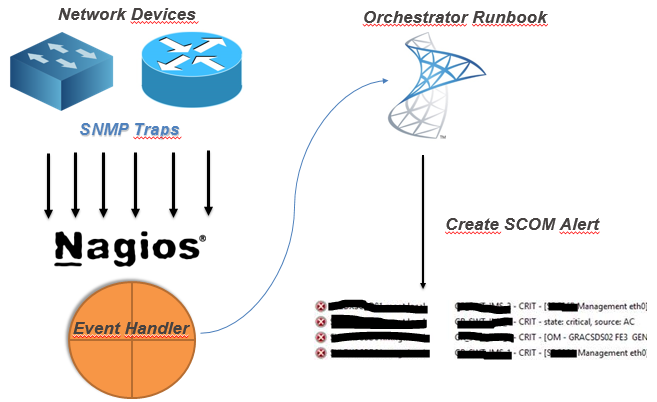
My idea (and working idea!) :

(yes, this was the powerpoint i sent to the customer! - hahah!)


So, after you've your monitoring criteria in Nagios configured, you need to :
  1. Create a Orchestrator Runbook that receives some parameters
  2. Create Nagios Event-Handler to 'consume' that runbook by orchestrator web-service


So, my Orchestrator Runbook :


Details about the MKAlertInput :


Create Alert details :


So, since i've got my runbook, i need to make a bash script to consume orchestrator runbook.
But, first, you need to know :
Your new runbook ID
And your runbook parameters ID
How ? Simple !
Connect to your MSSQL Server (Orchestrator BD) and run this :

 -- Runbook ID
 SELECT   
 Name as 'Runbook Name',  
 LOWER(ID) as 'Runbook ID'  
 FROM [Orchestrator].[Microsoft.SystemCenter.Orchestrator].[Runbooks]  
 -- Parameters ID
 SELECT LOWER(Parameters.Id) , Parameters.Name  
 FROM [Orchestrator].[Microsoft.SystemCenter.Orchestrator].[RunbookParameters] AS Parameters  
 INNER JOIN [Orchestrator].[Microsoft.SystemCenter.Orchestrator].[Runbooks] Runbooks ON Parameters.RunbookId = Runbooks.Id  
 -- THIS ID Showld be the one from the first query!  
 WHERE Runbooks.Id = '0B3E5FA3-A2E9-4337-BC63-050FC347A908'   

Since you got the ID's you need, you need to create your Nagios Event Handler, so every time you've na alert you can handle it and forward it to SCOM.


So, my script (for this scenario!)
 #!/bin/sh  
 # Nagios input data into vars#  
 host_name="$1"  
 description="$3"  
 plugin_output="$3 | $4 @ $5"  
 last_state_change=`date +"%d-%m-%Y %T"`  
 servicestate="$2"  
 # Orchestrator Info #  
 url='http://ORCHSERVER:81/Orchestrator2012/Orchestrator.svc/Jobs/'  
 user='DOMAIN\ORCHUSER'  
 password='ORCHPASSWORD'  
 case "$servicestate" in  
     OK)  
         echo ""  
     ;;  
     WARNING)  
         echo ""  
     ;;  
     CRITICAL)  
         xml="<?xml version=\"1.0\" encoding=\"utf-8\" standalone=\"yes\"?><entry xmlns:d=\"http://schemas.microsoft.com/ado/2007/08/dataservices\" xmlns:m=\"http://schemas.microsoft.com/ado/2007/08/dataservices/metadata\" xmlns=\"http://www.w3.org/2005/Atom\"><content type=\"application/xml\"><m:properties><d:Parameters>&lt;Data&gt;&lt;Parameter&gt;&lt;Name&gt;host_name&lt;/Name&gt;&lt;ID&gt;{c2555c8a-4c1c-4c04-a175-d27ccb27aeb3}&lt;/ID&gt;&lt;Value&gt;$host_name&lt;/Value&gt;&lt;/Parameter&gt;&lt;Parameter&gt;&lt;Name&gt;description&lt;/Name&gt;&lt;ID&gt;{e47406b6-fbd7-4bc5-b7a5-a1216f4fdfe5}&lt;/ID&gt;&lt;Value&gt;$description&lt;/Value&gt;&lt;/Parameter&gt;&lt;Parameter&gt;&lt;Name&gt;plugin_output&lt;/Name&gt;&lt;ID&gt;{406620e8-5fc0-4318-ad6b-987d9d491b09}&lt;/ID&gt;&lt;Value&gt;$plugin_output&lt;/Value&gt;&lt;/Parameter&gt;&lt;Parameter&gt;&lt;Name&gt;last_state_change&lt;/Name&gt;&lt;ID&gt;{35ab0932-df75-42d0-9715-935d3510b532}&lt;/ID&gt;&lt;Value&gt;$last_state_change&lt;/Value&gt;&lt;/Parameter&gt;&lt;/Data&gt;</d:Parameters><d:RunbookId type=\"Edm.Guid\">0b3e5fa3-a2e9-4337-bc63-050fc347a908</d:RunbookId></m:properties></content></entry>"  
         # XML 2 File  
         xml_file=`< /dev/urandom tr -dc _A-Z-a-z-0-9 | head -c10`  
         echo "$xml" > /tmp/$xml_file  
         # Post data into SCOrch Web-Service  
         curl --ntlm -u $user:$password -H 'Content-Type:application/atom+xml' -d @/tmp/$xml_file -X POST $url  
         ;;  
     UNKNOWN)  
         echo ""  
         ;;  
 esac  

Now, you need to tell nagios to use this script, so paste this config : (Remember, i'm using Check_MK)
 extra_nagios_conf += r"""  
 define command {  
   command_name  scorchws  
   command_line  /omd/sites/nagdsv/gdc/bin/orchestratorws.sh "$HOSTNAME$" "$SERVICESTATE$" "$SERVICEDESC$" "$SERVICEOUTPUT$" "$HOSTGROUPNAMES$"  
 }  
 """  
 extra_service_conf["event_handler"] = [  
   ( "scorchws", ALL_HOSTS, ALL_SERVICES ),  
 ]  
 extra_service_conf["event_handler_enabled"] = [  
   ( "1", ALL_HOSTS, ALL_SERVICES ),  
 ]  

Everything in place … this is what you get in SCOM :

Hope this could be helpful for you :)

Cheers,

Thursday, May 5, 2016

SCOrch (Orchestrator) - Runbook Monitor

I've got a bunch of Orchestrator Runbooks that need to be always running, and sometimes (reboots, or other reasons) those Runbooks maybe stopped.

So i've made this Powershell script to put on schedule tasks or somewhere else (perhaps a Operations Manager monitor - i'll do it later! :) )

The script :

<#
If for some reason you get the following PS error :
    Exception calling "GetResponse" with "0" argument(s): "The remote server returned an error: (400) Bad Request."

    Please log-in into Orchestrator Database and run :

    TRUNCATE TABLE [Microsoft.SystemCenter.Orchestrator.Internal].AuthorizationCache;
    EXEC [Microsoft.SystemCenter.Orchestrator.Maintenance].EnqueueRecurrentTask ‘ClearAuthorizationCache’

#>
 'Starting monitoring ... ' >> C:\Powershell\Log\RunbookManager.log  
 # Runbook names here :)  
 $OpsMgrRunbooks =@('1-Runbook','2-Runbook','3-Any-other-Runbook-Name')  
 $user = 'your_orchestrator_user'  
 $pass = ConvertTo-SecureString 'your_password' -AsPlainText -Force  
 $creds = New-Object System.Management.Automation.PsCredential($user,$pass)  
 foreach ($runbook in $OpsMgrRunbooks) {  
   $url = "http://YOUR_ORCHESTRATOR_SERVER:81/Orchestrator2012/Orchestrator.svc/Jobs()?`$expand=Runbook&`$filter=(Runbook/Name eq '$runbook')&`$select=Runbook/Name,Status"  
   $request = [System.Net.HttpWebRequest]::Create($url)  
   $request.Credentials = $creds  
   $request.Timeout = 120000  
   $request.ContentType = 'application/atom+xml,application/xml'  
   $request.Headers.Add('DataServiceVersion', '2.0;NetFx')  
   $request.Method = 'GET'  
   $response = $request.GetResponse()  
   $requestStream = $response.GetResponseStream()  
   $readStream=new-object System.IO.StreamReader $requestStream  
   $Output = $readStream.ReadToEnd()  
   $readStream.Close()  
   $response.Close()  
   $Output > $env:TEMP\1.log  
   $htmlid = Get-Content -Path $env:TEMP\1.log | Select-String -pattern '<id>.*Runbooks.*'  
   $bookid = ($htmlid -split "'")[1]  
   $status = $Output -match "<d:Status>Running</d:Status>"  
   If ($Status -ne $True) {  
     $request = ''  
     $request = [System.Net.HttpWebRequest]::Create("http://YOUR_ORCHESTRATOR_SERVER:81/Orchestrator2012/Orchestrator.svc/Jobs")  
     $request.Credentials = $creds  
     $request.Method = "POST"  
     $request.UserAgent = "Microsoft ADO.NET Data Services"  
     $request.Accept = "application/atom+xml,application/xml"  
     $request.ContentType = "application/atom+xml"  
     $request.KeepAlive = $true  
     $request.Headers.Add("Accept-Encoding","identity")  
     $request.Headers.Add("Accept-Language","en-US")  
     $request.Headers.Add("DataServiceVersion","1.0;NetFx")  
     $request.Headers.Add("MaxDataServiceVersion","2.0;NetFx")  
     $request.Headers.Add("Pragma","no-cache")  
 $requestBody = @"  
 <?xml version="1.0" encoding="utf-8" standalone="yes"?>  
 <entry xmlns:d="http://schemas.microsoft.com/ado/2007/08/dataservices" xmlns:m="http://schemas.microsoft.com/ado/2007/08/dataservices/metadata" xmlns="http://www.w3.org/2005/Atom">  
   <content type="application/xml">  
     <m:properties>  
       <d:RunbookId m:type="Edm.Guid">$bookid</d:RunbookId>  
     </m:properties>  
   </content>  
 </entry>  
 "@      
     $requestStream = new-object System.IO.StreamWriter $Request.GetRequestStream()  
     $requestStream.Write($RequestBody)  
     $requestStream.Flush()  
     $requestStream.Close()  
     [System.Net.HttpWebResponse]$response=[System.Net.HttpWebResponse] $Request.GetResponse()  
     $responseStream = $Response.GetResponseStream()  
     $readStream = new-object System.IO.StreamReader $responseStream  
     $responseString = $readStream.ReadToEnd()  
     $readStream.Close()  
     $responseStream.Close()  
     if ($response.StatusCode -eq 'Created') {  
       $jobId = ([xml]$responseString).entry.content.properties.Id.InnerText  
       "Successfully started runbook: $rubook. Job ID: $jobId" >> C:\Powershell\Log\RunbookManager.log  
     }  
     else { "Could not start runbook $runbook. Status: $response.StatusCode" >> C:\Powershell\Log\RunbookManager.log }  
   }  
   Else { "Runbook $runbook | $bookid - Already running" >> C:\Powershell\Log\RunbookManager.log }  
 }  

You'll get the following output :

Runbook 1.Runbook_Testing | 6063dfb2-0f86-4b49-bc38-72a9bef9239c - Already running
Runbook 1.2 SCOM Close Alert | 0d51fb6e-0112-4e91-84f1-a713cd5fd1ae - Already running
Runbook 1 - AlertForwarding | 22585473-7906-4ca4-b4e3-121657cb2e42 - Already running
Successfully started runbook. Job ID:  0a1fdc16-dce4-4585-a2a2-a3da273a704e
Successfully started runbook. Job ID:  ee345fc4-f21b-4d05-be8c-c47249ceec36

Hope you find it useful :)

Cheers,