Showing posts with label dashboard. Show all posts

Monday, August 8, 2016

Powershell - SCOM (OpsMgr) Distributed Application to SCCM (ConfigMgr) Collection

For reporting purposes i had to create equal SCCM collections with the same members that i had in SCOM Distributed Applications.
Now that i have same DA as Collections, and respective members, i can match alerts (DA from SCOM), as well i can have a list of required updates (Collection from SCCM) in the same PowerBI report.
It can be really useful for Application Owners or Sys Admin teams.

Instead of creating by hand every DA I've in SCCM as a collection, and since i've got around 60 DA's, i came up with this script!
(Sorry for the variable names, and for some bad code - not having the time i need to get it better!)
(PS: Read the comments before you run the script! :) )

 Import-Module OperationsManager  
 # Your SCCM Server  
 $SCCMServer = 'Your SCCM Server'  
 $Class = Get-SCOMClass -DisplayName 'User Created Distributed Application'  
 $DistrApps = Get-SCOMClassInstance -Class $Class  
 $DARelationList = ''  
 $ListaDAandHosts = @()  
 Foreach ($DA in $DistrApps) {  
   $DAHosts = ($DA | % {$_.GetRelatedMonitoringObjects()} | % {$_.GetRelatedMonitoringObjects()}).DisplayName  
   Foreach ($Hostz in $DAHosts) {  
     $ListaDAandHosts += $DA.DisplayName + ';' + ($Hostz -split '\.')[0]  
   }  
 }  
 #This is because i only want DA with valid hostnames!  
 $RegexQuery=[regex]"^[0-9A-Za-z].*;(?=.{1,255}$)[0-9A-Za-z](?:(?:[0-9A-Za-z]|-){0,61}[0-9A-Za-z])?(?:\.[0-9A-Za-z](?:(?:[0-9A-Za-z]|-){0,61}[0-9A-Za-z])?)*\.?$"  
 $ListaDA = @()  
 $ListaDA += 'DA;ServerFQDN'  
 Foreach ($line in $ListaDAandHosts) {  
   If ($RegexQuery.Match($line).Success -eq $true) {      
       $ListaDA += $RegexQuery.Match($line).Groups[0].Value  
   }  
 }  
 # Set the out-file as you like!  
 $ListaDA | Out-File "\\\$SCCMServer\c$\FOLDER\ListaDA.csv"  
 $SCCMScriptBlock = {  
   Import-Module "D:\Program Files\Microsoft Configuration Manager\AdminConsole\bin\ConfigurationManager.psd1"  
   $DACSV = Import-csv 'C:\GDC\ListaDA.csv' -Delimiter ';'  
   $DAList = ($DACSV | Group {$_.DA.Substring(0)}).Name  
   # Set Location to Site Name #  
   Set-Location YOUR_SITE_NAME:  
   # Your SCCM Limit Collection #  
   $Limitingcollections = "All Systems"  
   # Let the show begin #  
   Foreach ($DA in $DAList) {  
     $DAHostList = @()  
     $DAHosts = (($DACSV | ? { $_.DA -eq $DA } | Select ServerFQDN).ServerFQDN)  
     # Create DA If not Exists #    
     If (Get-CMDeviceCollection -Name $DA) {  
       # Does Nothing #  
       $DA + ' | Already exists!'  
     } Else {  
       $DANewCollection = New-CMDeviceCollection -Name "$DA" -LimitingCollectionName $Limitingcollections  
     }  
     # Add each host to Collection #  
     Foreach ( $SCCMAgent in $DAHosts ){  
       Try {  
         Add-CMDeviceCollectionDirectMembershipRule -CollectionName "$DA" -ResourceID $(get-cmdevice -name "$SCCMAgent").ResourceID  
       } Catch {  
         $SCCMAgent + ' | Already in Collection or not found'  
       }  
     }  
       # Move your collection to specific location - if you want to #  
     Move-CMObject -FolderPath 'SITE_NAME:\DeviceCollection\YOUR_SPECIFIC_FOLDER' -InputObject $DANewCollection  
   }  
 }  
 $SCCMSession = New-PSSession -ComputerName $SCCMServer  
 Invoke-Command -Session $SCCMSession -scriptblock $SCCMScriptBlock  

And, that's it!

Friday, April 8, 2016

SCCM - Inventory SQL Query (Server Info)

The guy who manages CMDB wanted to update some CMDB fields, like Total Memory, CPU, Storage and OS Information on every registered server.

So, since SCCM is our configuration and also our "inventory" application, perhaps we could do some SQL-Query to save the day.

 SELECT DISTINCT   
    [RSYS].Netbios_Name0 AS [CI Name],  
      ROUND([OS].TotalVirtualMemorySize0 / CAST(1024 AS FLOAT),0) AS [Total RAM (GB)],  
      CASE WHEN ISNULL(SUM(CAST([LDISK].Size0 AS INT)),0) / 1024 > 0  
      THEN ISNULL(SUM(CAST([LDISK].Size0 AS INT)),0) / 1024  
      ELSE 1  
      END AS [Total Storage (GB)],  
      ROUND(SUM(CAST([LDISK].FreeSpace0 AS FLOAT) ) / CAST(1024 AS FLOAT),1) AS [Total Free Space (GB)],  
      [CPU].Name0 AS [CPU Info],  
      CASE WHEN [CPU].NumberOfCores0 IS NULL THEN '0' ELSE [CPU].NumberOfCores0 END AS Cores,  
      CASE WHEN [CPU].NumberOfLogicalProcessors0 IS NULL THEN '0' ELSE [CPU].NumberOfLogicalProcessors0 END AS [Logical Processors],  
      COUNT([CPU].ResourceID) AS [Number of CPUs],  
      [OS].Caption0 AS [OS]  
  FROM v_R_System RSYS  
      JOIN v_GS_PROCESSOR CPU on RSYS.ResourceID = CPU.ResourceID  
    JOIN v_GS_LOGICAL_DISK LDISK on RSYS.ResourceID = LDISK.ResourceID   
      JOIN v_GS_OPERATING_SYSTEM OS ON RSYS.ResourceID = OS.ResourceID  
 WHERE ISNULL([RSYS].Obsolete0, 0) <> 1  
 AND [LDISK].Size0 IS NOT NULL  
 AND ( [LDISK].DeviceID0 = 'C:' OR [LDISK].VolumeName0 = '/' )  
 GROUP BY [RSYS].Netbios_Name0, [OS].Caption0, [OS].TotalVirtualMemorySize0, [CPU].Name0, [LDISK].DeviceID0, [LDISK].VolumeName0, [LDISK].Size0,[CPU].NumberOfCores0,[CPU].NumberOfLogicalProcessors0  
 ORDER BY [RSYS].Netbios_Name0  

This will give you something like this :


See you soon!

Wednesday, April 6, 2016

OpsMgr (SCOM) - Alerts per group SQL Query (+) Datazen Dashboard

Since i showed up how to get it in a last post, a PFE friend of mine noticed something it migh consern, and to be honest i didn't pointed out because to me was not an issue, but, i understand it might me to some of you.

It doesn't give you a recursive membership alerts.
My older post will only give you object specific alerts on that group, "nothing else"!
So, i started to think on how i could help me (and you!) out with this "issue", and came up with this ideia.

First, i've showed how to do this by powershell.
All alerts for specific group, in a specific time range, and for specific severity - this were my filters.
But, how can i "translate" powershell into SQL ?
SQL-Profiler!
Basically when you run a powershell cmd-let like :
Get-SCOMAlert -Criteria (...)
You're connecting into OperationsManager database and making a query.

So, the query goes as follow:

First, i create a temp table i can put my "groups".

DECLARE @TMP_GROUP_TABLE table(BaseManagedEntityId uniqueidentifier, DisplayName varchar(50));  
 INSERT INTO @TMP_GROUP_TABLE  
 SELECT BaseManagedEntityId, DisplayName FROM basemanagedentity WITH (nolock)  
 WHERE DisplayName = ('Group Name Here')  
 OR DisplayName = ('Other Group')  
 OR DisplayName = ('Other Group')  
 OR DisplayName = ('Other Group')  
 OR DisplayName = ('Other Group')  
 OR DisplayName = ('Other Group')

Then, the magic query - it's already made up to join the temp table and add the group name in the end of it :) (Promise i'll make a post about SQL-Profiler!)

 DECLARE @LanguageCode1 varchar(3)  
 DECLARE @LanguageCode2 varchar(3)  
 DECLARE @ParentManagedEntityId uniqueidentifier  
 DECLARE @ResolutionState0 nvarchar(max)  
 DECLARE @Severity0 nvarchar(max)  
 DECLARE @TimeRaised0 datetime  
 SET @LanguageCode1='ENU' ; SET @LanguageCode2=NULL  
 SET @ResolutionState0=N'0' ; SET @Severity0=N'1'; SET @TimeRaised0='2016-04-04 00:00:00'  
 SELECT DISTINCT [AlertView].[Id],[AlertView].[Name],[AlertView].[Description],[AlertView].[MonitoringObjectId],[AlertView].[ClassId],[AlertView].[MonitoringObjectDisplayName],[AlertView].[MonitoringObjectName],  
                 [AlertView].[MonitoringObjectPath],[AlertView].[MonitoringObjectFullName],[AlertView].[IsMonitorAlert],[AlertView].[ProblemId],[AlertView].[RuleId],[AlertView].[ResolutionState],[AlertView].[Priority],  
                 [AlertView].[Severity],[AlertView].[Category],[AlertView].[Owner],[AlertView].[ResolvedBy],[AlertView].[TimeRaised],[AlertView].[TimeAdded],[AlertView].[LastModified],[AlertView].[LastModifiedBy],  
                 [AlertView].[TimeResolved],[AlertView].[TimeResolutionStateLastModified],[AlertView].[CustomField1],[AlertView].[CustomField2],[AlertView].[CustomField3],[AlertView].[CustomField4],[AlertView].[CustomField5],  
                 [AlertView].[CustomField6],[AlertView].[CustomField7],[AlertView].[CustomField8],[AlertView].[CustomField9],[AlertView].[CustomField10],[AlertView].[TicketId],[AlertView].[Context],[AlertView].[ConnectorId],  
                 [AlertView].[LastModifiedByNonConnector],[AlertView].[MonitoringObjectInMaintenanceMode],[AlertView].[MonitoringObjectHealthState],[AlertView].[ConnectorStatus],[AlertView].[RepeatCount],  
                 [MT_Computer].[NetbiosComputerName],[MT_Computer].[NetbiosDomainName],[MT_Computer].[PrincipalName],[AlertView].[LanguageCode],[AlertView].[AlertParams],[AlertView].[SiteName],  
                 [AlertView].[MaintenanceModeLastModified],[AlertView].[StateLastModified],[AlertView].[TfsWorkItemId],[AlertView].[TfsWorkItemOwner],  
                 [TEMP].DisplayName AS GroupName  
 FROM dbo.fn_AlertView(@LanguageCode1, @LanguageCode2) AS AlertView   
 LEFT OUTER JOIN dbo.MT_Computer ON AlertView.TopLevelHostEntityId = MT_Computer.BaseManagedEntityId  
 INNER JOIN dbo.RecursiveMembership AS RM ON AlertView.MonitoringObjectId = RM.ContainedEntityId   
 INNER JOIN @TMP_GROUP_TABLE AS TEMP ON RM.ContainerEntityId = TEMP.BaseManagedEntityId  
 WHERE (AlertView.[ResolutionState] = @ResolutionState0   
 AND AlertView.[Severity] >= @Severity0   
 AND AlertView.[TimeRaised] > @TimeRaised0)   
 AND (((RM.ContainerEntityId IN ( SELECT BaseManagedEntityId FROM @TMP_GROUP_TABLE ) )))   
 ORDER BY [AlertView].[LastModified] DESC  

Since you got your data into place, let's make the Datazen Dashboard for your teams!


This is a 5 minutes dashboard, you can edit the query to set some "alert thresholds" and create a more "KPI" oriented alert view dashboad in Datazen.

Cheers,

Monday, April 4, 2016

OpsMgr (SCOM) - Alerts per group SQL Query

A few days ago, i showed up how to get SCOM alerts for a certain group in Powershell.
Now i needed to put it in DataZen and i could, but it's more simple to get data by SQL, so, the query i came up with is this :

 DECLARE @TMP_GROUP_TABLE table(groupname varchar(50));  
 insert into @TMP_GROUP_TABLE   
 values('Group #1'), -- List  
      ('Group #2'), -- Of   
      ('Group #3'), -- Groups   
      ('Group #4'), -- You  
      ('Group #5') -- Want  
 SELECT   
     s.displayName as [Group],   
     CASE WHEN t.Path IS NULL THEN t.DisplayName ELSE t.path END AS [CI],  
     av.AlertName as [Alert Name],  
     av.AlertDescription as [Description],  
     count(av.AlertName) as [AlertCount],  
     ResolutionState, RaisedDateTime,av.Severity  
 FROM vrelationship r   
      inner join vManagedEntity s on s.ManagedEntityRowId = r.SourceManagedEntityRowId   
      inner join vManagedEntity t on t.ManagedEntityRowId = r.TargetManagedEntityRowId   
      inner join Alert.vAlert av on av.ManagedEntityRowId= t.ManagedEntityRowId  
      inner JOIN Alert.vAlertDetail adv on av.AlertGuid =adv.AlertGuid   
      inner JOIN Alert.vAlertResolutionState arsv on av.AlertGuid =arsv.AlertGuid   
      inner JOIN Alert.vAlertParameter apv on av.AlertGuid =apv.AlertGuid   
 WHERE   
      -- I choose 7 days, you can put a value as you like  
      RaisedDateTime >=DATEADD(day,-7,GETDATE())  
      and s.DisplayName IN ( SELECT groupname FROM @TMP_GROUP_TABLE )  
      -- Filter only for CRIT and WARN alarms  
      AND av.Severity >= 1  
 group by s.displayName,t.displayname,av.AlertDescription,ResolutionState,RaisedDateTime,av.Severity,av.AlertName,t.Path  
 order by AlertCount desc  

This is good so you can create a nice Datazen dashboard to keep teams up with their alarms (you can put their objects inside respective groups).

Feel free to criticize, no SQL master at all (lol!)

Thursday, March 31, 2016

OpsMgr (SCOM) - Powershell Event Views Dashboard

I don't like the idea to have lot's of console connecting to my Management Servers, so i give my clients the webconsole link.
But, as you migh know, there's a bunch of limitiations, like "Event Views" don't show up.
So, i had the need to overcome this issue.

Solution was to put Powershell in a SCOM Dashboard.

First, create a new Powershell Grid Layout "Dashboard View" with one cell.
Configure it and paste this code :

 # This example is for a Rule i have for unexpected restart/shutdowns (EventID = 1074)  
 # You can change as you want!  
 $a = Get-SCOMManagementGroup  
 $b = New-Object Microsoft.EnterpriseManagement.Monitoring.MonitoringEventCriteria "RuleId='e7c857e6-7654-5f89-ecdf-8f93325c83ee'"  
 $Events = $a.GetMonitoringEvents($b)  
 $i = 0  
 foreach ($Event in $Events) {  
   $EventDescription = 'User : ' + [string]$Event.Parameters[6] + ' || Type : ' + [string]$Event.Parameters[4] + ' || Reason : ' + [string]$Event.Parameters[5]  
   $TimeAdded = $Event.TimeAdded  
   $LoggingComputer = [string]$Event.LoggingComputer  
   $dataObject = $ScriptContext.CreateInstance("xsd://foo!bar/baz")  
   $dataObject["Id"]=$i.toString()  
   $dataObject["TimeAdded"]=$TimeAdded  
   $dataObject["LoggingComputer"]=$LoggingComputer  
   $dataObject["Description"]=$EventDescription  
   $ScriptContext.ReturnCollection.Add($dataObject)  
   $i++  
 }  

:) Enjoy!

Friday, March 4, 2016

SCCM - Security and Critical Updates | Datazen Dashboard

Recently i needed to provide customer a dashboard on the missing patches for every machines in the park - and because managers like the fancy datazen dashboards, and i also like the easy way we can build some dashboards - why not ?

First of all, created this datasource in Datazen CP :


 SELECT    dbo.v_R_System.Name0 AS 'Computername', dbo.v_UpdateInfo.Title AS 'Updatename', dbo.v_StateNames.StateName, dbo.v_UpdateInfo.InfoURL,  
         dbo.v_Update_ComplianceStatusAll.LastStatusCheckTime, dbo.v_UpdateInfo.DateLastModified, dbo.v_UpdateInfo.IsDeployed, dbo.v_UpdateInfo.IsSuperseded,   
         dbo.v_UpdateInfo.IsExpired, dbo.v_UpdateInfo.BulletinID, dbo.v_UpdateInfo.ArticleID, dbo.v_UpdateInfo.DateRevised,   
         catinfo.CategoryInstanceName as 'Vendor',  
     catinfo2.CategoryInstanceName as 'UpdateClassification',  
         COUNT(case when catinfo2.CategoryInstanceName like 'Security%' then '1' else NULL end ) IsSecurity,  
         COUNT(case when catinfo2.CategoryInstanceName like 'Critical%' then '1' else NULL end ) IsCritical  
 FROM    dbo.v_StateNames  
         INNER JOIN dbo.v_Update_ComplianceStatusAll  
         INNER JOIN dbo.v_R_System ON dbo.v_R_System.ResourceID = dbo.v_Update_ComplianceStatusAll.ResourceID  
         INNER JOIN dbo.v_UpdateInfo ON dbo.v_UpdateInfo.CI_ID = dbo.v_Update_ComplianceStatusAll.CI_ID ON dbo.v_StateNames.StateID = dbo.v_Update_ComplianceStatusAll.Status  
         INNER JOIN v_CICategories_All catall on catall.CI_ID = dbo.v_UpdateInfo.CI_ID  
         INNER JOIN v_CategoryInfo catinfo on catall.CategoryInstance_UniqueID = catinfo.CategoryInstance_UniqueID and catinfo.CategoryTypeName='Company'  
         INNER JOIN v_CICategories_All catall2 on catall2.CI_ID=dbo.v_UpdateInfo.CI_ID  
         INNER JOIN v_CategoryInfo catinfo2 on catall2.CategoryInstance_UniqueID = catinfo2.CategoryInstance_UniqueID and catinfo2.CategoryTypeName='UpdateClassification'  
 WHERE    (dbo.v_StateNames.TopicType = 500)  
 AND        (dbo.v_StateNames.StateName = 'Update is required')  
 AND        (dbo.v_R_System.Name0 IN   
           (SELECT TOP (100) PERCENT SD.Name0 AS 'Machine Name'  
             FROM    dbo.v_R_System AS SD INNER JOIN  
                     dbo.v_FullCollectionMembership AS FCM ON SD.ResourceID = FCM.ResourceID INNER JOIN  
                     dbo.v_Collection AS COL ON FCM.CollectionID = COL.CollectionID LEFT OUTER JOIN  
                     dbo.v_R_User AS USR ON SD.User_Name0 = USR.User_Name0 INNER JOIN  
                     dbo.v_GS_PC_BIOS AS PCB ON SD.ResourceID = PCB.ResourceID INNER JOIN  
                     dbo.v_GS_COMPUTER_SYSTEM AS CS ON SD.ResourceID = CS.ResourceID INNER JOIN  
                     dbo.v_RA_System_SMSAssignedSites AS SAS ON SD.ResourceID = SAS.ResourceID  
             ))  
 AND        ((catinfo2.CategoryInstanceName like 'Critical%' ) OR (catinfo2.CategoryInstanceName like 'Security%' ))  
 GROUP BY dbo.v_R_System.Name0 , dbo.v_UpdateInfo.Title, dbo.v_StateNames.StateName,   
         dbo.v_Update_ComplianceStatusAll.LastStatusCheckTime, dbo.v_UpdateInfo.DateLastModified, dbo.v_UpdateInfo.IsDeployed, dbo.v_UpdateInfo.IsSuperseded,   
         dbo.v_UpdateInfo.IsExpired, dbo.v_UpdateInfo.BulletinID, dbo.v_UpdateInfo.ArticleID, dbo.v_UpdateInfo.DateRevised,   
         catinfo.CategoryInstanceName, catinfo2.CategoryInstanceName, dbo.v_UpdateInfo.InfoURL  

Then created this dashboard :


The challange now is to make this possible to any group of collection we might want to.

I made a post about it ... give it a try:

http://itopstuff.blogspot.pt/2015/11/sccm-missing-updates-per-collection.html

:)

OpsMgr (SCOM) - Alert Views without any console ?

Recently i got the need to put "Alert Views" on 4 different Teams TV's.

My first though was ... "WebConsole can't do the job ..."
So i remembered that PS1 could save my day!

Cons:

- SCOM Web Console too slow;
- You need IE;
- ... and silverlight;

Solution :

- Created a PS1 that for every different group i want gets latest 24h alerts (Warn/Crit);
- Foreach group i create an HTML file and put it on my favourite Web-Server;
- Created a Runbook that for a 90 seconds schedule runs the PS1;
      - You can also have a Scheduled Task for the Job;
- HTML has a meta tag that makes HTML refresh every 30 seconds;


 Import-Module OperationsManager  
 New-SCOMManagementGroupConnection -ComputerName "SCOMSERVER_GOES_HERE"  
 $MyGroups = @()  
 Foreach ($item in Get-Content C:\OpsMgr\WebAlertViews\conf\Groups.conf ) {  # Dont Forget to change this!
     $MyGroups += Get-SCOMGroup -DisplayName $item  
 }  
 $newTime = (Get-Date).AddHours(-24)  
 $Criteria = New-Object Microsoft.EnterpriseManagement.Monitoring.MonitoringAlertCriteria("ResolutionState = 0 AND Severity >= 1 AND TimeRaised > `'$newTime`'")  
 $TransversalDepth = [Microsoft.EnterpriseManagement.Common.TraversalDepth]::Recursive  
 Foreach ( $Group in $MyGroups ) {  
     $Head = "<meta http-equiv='refresh' content='30'>"  
     $Head +="<style>"  
     $Head +="BODY{background-color:White;font-family:Verdana,sans-serif; font-size: x-small;}"  
     $Head +="TABLE{font-family: verdana,arial,sans-serif; font-size:12px; color:#333333; border-width: 1px; border-color: #666666; border-collapse: collapse;}"  
     $Head +="TH{border-width: 1px; padding: 8px; border-style: solid; border-color: #666666; background-color: #dedede;}"  
     $Head +="TD{border-width: 1px; padding: 8px; border-style: solid; width:auto;}"  
     $Head +="</style>"  
     $Body = "<br><br>"  
     $Body += "<img src='.\images\nos_logo_detail.png' height='12%' width='12%'>"  
     $Body += "<center><h1 style=color:#999999>.: Relatório SCOM - Alert View | $(($Group).DisplayName) :.</center>"  
     $Body += "<center><table>"  
     $Body += "<tr>"  
     $Body += "<td>Severity</td>"  
     $Body += "<td>Time Raised</td>"  
     $Body += "<td>Path</td>"  
     $Body += "<td>Name</td>"  
     $Body += "<td>DisplayName</td>"  
     $Body += "<td>Description</td>"  
     $Body += "</tr>"  
     $Alerts = $Group.GetMonitoringAlerts( $Criteria, $TransversalDepth )  
     Foreach ($Alert in $Alerts ) {  
         If ($Alert.Severity -eq 2) { $image = 'critical.png' }  # You need this files
         If ($Alert.Severity -eq 1) { $image = 'warning.png' }  
         $Body += "<tr>"  
         $Body += "<center><td><img src='.\images\$Image' height='25px' width='25px'></td></center>"  
         $Body += "<td>$(($alert).TimeRaised)</td>"  
         $Body += "<td>$(($alert).MonitoringObjectPath)</td>"    
         $Body += "<td>$(($alert).Name)</td>"  
         $Body += "<td>$(($alert).MonitoringObjectDisplayName)</td>"  
         $Body += "<td>$(($alert).Description)</td>"  
         $Body += "</tr>"  
     }      
     $Body += "</table></center>"  
     # I got the above replace because of "Unix/Linux Group!"
     $HTMLFileName = (($Group.DisplayName -replace '/','_') -replace ' ','') + '.html'  
     $HTML = ConvertTo-Html -Head $head -Body $Body  
     $HTML > \\MyWebServer\SiteName\AlertViews\AlertView_$HTMLFileName    
 }  

Tuesday, February 16, 2016

[SCOM & Orchestrator] - Alert Forwarding

Let's analyse this scenario:

You want SCOM to forward alerts or open alerts as incidents in a third-party software.

Cons:
SCOM have a limitation when it comes to process alerts;
Only "Notification Pool Members" can manage notifications;
If your channel/subscrition relationship is heavy, you might get a problem - unmanaged alerts.

Pros:
All the Cons! :)

Now, the idea : (Thanks to a PFE friend! MD Thank you!)
What about SCOM just mark the alerts with some kind of tag, and then let Orchestrator listening for that tag, and let Orchestrator do the rest ?
So, for every subscription i've i call a powershell script based channel with this code :
Param([string]$AlertId,[string]$subscriptionID)
Import-Module OperationsManager
$MySubId = $subscriptionID.toString()
$MyAlertId = $AlertID.toString()
$sub = (Get-SCOMNotificationSubscription -Id $MySubId).DisplayName
Get-SCOMAlert -Id $MyAlertId | Set-SCOMAlert -CustomField5 ":waiting" -CustomField6 $sub

On the other hand i've got a channel (command line) based, configured like this :
Full Path of the command line : C:\Windows\system32\WindowsPowerShell\v1.0\powershell.exe
Command line parameters : -Command "& '"C:\OpsMgr\Powershell\Notifications\_OpsMgr_Set-SCOMAlert.ps1"'" -alertID '$Data/Context/DataItem/AlertId$' -subscriptionID '$MPElement$'
Startup folder for the command line : C:\Windows\system32\WindowsPowerShell\v1.0\


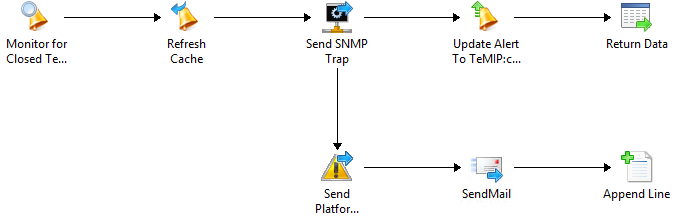
And i've got this runbook on the other side (Orch):

1) Create alerts on the other side :

2) Close alerts on the other side : (If a SCOM Alert gets closed!)

In my case i send a SNMP Trap to my "central" alarm system with specific identifiers, and when i do it i mark the "-CustomField5" as Forwarded just to make sure and let everyone know that my alarm was processed.

If you have any questions, just let me know! :)

Cheers

OpsMgr (SCOM) - Event Views on Web-Console ? Sure!

Well, it's possible! Don't worry!
Just create a new one grid dashboard with a powershell grid widget and paste the following code :
 $Class = Get-SCOMClass -DisplayName 'Windows Server'$Instance = Get-SCOMClassInstance -Class $Class  
 $Events = Get-SCOMEvent -Instance $Instance -EventId 1074 | Sort-Object TimeAdded -Descending | Select -First 50  
 $i = 0  
 foreach ($Event in $Events) { 
 $EventDescription = 'User : ' + [string]$Event.Parameters[6] + ' || Type : ' + [string]$Event.Parameters[4] + ' || Reason : ' + [string]$Event.Parameters[5]  
 $TimeAdded = $Event.TimeAdded  
 $LoggingComputer = [string]$Event.LoggingComputer  
 $dataObject = $ScriptContext.CreateInstance("xsd://foo!bar/baz")  
 $dataObject["Id"]=$i.toString()  
 $dataObject["TimeAdded"]=$TimeAdded  
 $dataObject["LoggingComputer"]=$LoggingComputer  
 $dataObject["Description"]=$EventDescription  
 $ScriptContext.ReturnCollection.Add($dataObject)  
 $i++  
 }  


I've made this for a event collection i've in a customer for restart events (1074) - you might change as you like.
And enjoy the show :)

Monday, November 9, 2015

OpsMgr (SCOM) - CA Certificates Powershell Magic

If you're a SCOM Administrator, you've been through this ...

Create PFX certificates for a couple of hundreds machines that don't belong to any domain you trust, or just belong to workgroup ... So, since i hate to do the same thing more than 2 times i did this :

 $CAName = 'CA-SERVER.DOMAIN\DOMAIN-CA'  
 $CertPassword = 'YourCertificaPassword'  
 $CertTemplate = 'YourCAOpsMgrTemplate'  
   
 Set-Location C:\tmp\SCOM_CERTS\  
   
 foreach ($agent in (Get-Content Agent-List.txt))  
 {  
 Remove-Item ($agent + '.*') -Force  
 $inffile = $agent + '.inf'  
 '[NewRequest]' > $inffile  
 'Subject="CN=' + $agent + '"' >> $inffile  
 'Exportable=TRUE' >> $inffile  
 'KeyLength=1024' >> $inffile  
 'MachineKeySet=TRUE' >> $inffile  
 'FriendlyName="' + $agent + '"' >> $inffile  
 '[RequestAttributes]' >> $inffile  
 'CertificateTemplate="' + $CertTemplate + '"' >> $inffile  
 $reqfile = $agent + '.req'  
 $certfile = $agent + '.cer'  
 $pfxname = $agent + '.pfx'  
 certreq -New $inffile $reqfile  
 certreq -Submit -config $CAName $reqfile $certfile  
 certreq -accept $certfile  
 certutil -exportpfx -p $CertPassword $agent $pfxname "NoChain,NoRoot"  
 certutil -delstore my $agent  
 Remove-Item $inffile,$reqfile,$certfile  
 }  


Have fun! :)

Friday, November 6, 2015

SCCM Missing updates per Collection

Recently a customer had the need to have a simple query/report so they could know which updates (critical and security) were missing in a specific collection in SCCM
So, and i'm not a SCCM database schema expert, googled for an half an hour, and found several queries, but ... not what we needed - so i decided to retrieve the best of each, and put it all in one single query

And came out with this :

 SELECT dbo.v_R_System.Name0 AS 'Computername', dbo.v_UpdateInfo.Title AS 'Updatename', dbo.v_StateNames.StateName, dbo.v_Update_ComplianceStatusAll.LastStatusCheckTime, dbo.v_UpdateInfo.DateLastModified, dbo.v_UpdateInfo.IsDeployed, dbo.v_UpdateInfo.IsSuperseded,  
 dbo.v_UpdateInfo.IsExpired, dbo.v_UpdateInfo.BulletinID, dbo.v_UpdateInfo.ArticleID, dbo.v_UpdateInfo.DateRevised,  
 catinfo.CategoryInstanceName as 'Vendor',  
 catinfo2.CategoryInstanceName as 'UpdateClassification'  
 FROM dbo.v_StateNames  
 INNER JOIN dbo.v_Update_ComplianceStatusAll  
 INNER JOIN dbo.v_R_System ON dbo.v_R_System.ResourceID = dbo.v_Update_ComplianceStatusAll.ResourceID  
 INNER JOIN dbo.v_UpdateInfo ON dbo.v_UpdateInfo.CI_ID = dbo.v_Update_ComplianceStatusAll.CI_ID ON dbo.v_StateNames.StateID = dbo.v_Update_ComplianceStatusAll.Status  
 INNER JOIN v_CICategories_All catall on catall.CI_ID = dbo.v_UpdateInfo.CI_ID  
 INNER JOIN v_CategoryInfo catinfo on catall.CategoryInstance_UniqueID = catinfo.CategoryInstance_UniqueID and catinfo.CategoryTypeName='Company'  
 INNER JOIN v_CICategories_All catall2 on catall2.CI_ID=dbo.v_UpdateInfo.CI_ID  
 INNER JOIN v_CategoryInfo catinfo2 on catall2.CategoryInstance_UniqueID = catinfo2.CategoryInstance_UniqueID and catinfo2.CategoryTypeName='UpdateClassification'  
 WHERE (dbo.v_StateNames.TopicType = 500)  
 AND (dbo.v_StateNames.StateName = 'Update is required')  
 AND (dbo.v_R_System.Name0 IN  
 (SELECT TOP (100) PERCENT SD.Name0 AS 'Machine Name'  
 FROM dbo.v_R_System AS SD INNER JOIN  
 dbo.v_FullCollectionMembership AS FCM ON SD.ResourceID = FCM.ResourceID INNER JOIN  
 dbo.v_Collection AS COL ON FCM.CollectionID = COL.CollectionID LEFT OUTER JOIN  
 dbo.v_R_User AS USR ON SD.User_Name0 = USR.User_Name0 INNER JOIN  
 dbo.v_GS_PC_BIOS AS PCB ON SD.ResourceID = PCB.ResourceID INNER JOIN  
 dbo.v_GS_COMPUTER_SYSTEM AS CS ON SD.ResourceID = CS.ResourceID INNER JOIN  
 dbo.v_RA_System_SMSAssignedSites AS SAS ON SD.ResourceID = SAS.ResourceID  
 WHERE (COL.Name like 'NOS - Patch Management OUT%')))  
 AND ((catinfo2.CategoryInstanceName like 'Critical%' ) OR (catinfo2.CategoryInstanceName like 'Security%' ))  

Result :

I'm not a SQL expert (at all!) so, if you've any other way to get this data, please, feel free to share!
Cheers!