Showing posts with label powershell. Show all posts

Thursday, March 1, 2018

[Powershell + OMS HTTP Data Collection API] - Get & Send data from a MS-SQLServer to OMS Log Analytics

Earlier in my post about using the OMS Data Collector API, i promissed that i would post something about it but in a Powershell way of doing it - today is the day.
Somewhere in the past i had the need to put some data stored in a on-prem database to OMS so we could use it's own Analysis engine.
So, obviously, from where you run this, you need to have internet connection or configured HTTP proxy - just sayin'! :)

In my case i needed to have a timestamp stored for the last time i queried data so i don't have duplicated data in OMS, so analysis could be more accurate - this Powershell script version doesn't contain that logical part of code, it's more raw so you could understand how it's done and after it, you could obvisouly change it's logic as i did, or add some other logic.

Before we go to the script itself, let me just explain the part of how we store data and then convert it to JSON.

As you might see i store data from MSSQL in a 'System.Data.DataTable' (variable $table).
So the right to way to change it to JSON is making - $table | select $table.Columns.columnname | ConvertTo-Json
As so, you'll have data in the above and correct format :

{
"property1": "value1",
"property2": "value2"
"property3": "value3",
"property4": "value4"
}

Where "property1", "property2" and so on is your table column names. This ways you only have to concern about the query fields you want/like.

So, this is the powershell i came up with - it's been great to have something like this to do some magic.


# Database
$SQLServer = "YOUR_MSSQL_SERVER"
$SQLDBName = "YOUR_DATABASE"
$SqlQuery = "YOUR_QUERY"

#OMS
$customerId = 'xxxxxxxxxxxxxxxxxxxxxxxxxxxxxxxx'
$SharedKey = 'xxxxxxxxxxxxxxxxxxxxxxxxxxxxxxxx'
$dataType = "YOUR_OMS_CUSTOM_LOG_FILE_NAME"
# Function to create the authorization signature
Function New-Signature ($customerId, $sharedKey, $date, $contentLength, $method, $contentType, $resource)
{
  $xHeaders = 'x-ms-date:' + $date
  $stringToHash = $method + "`n" + $contentLength + "`n" + $contentType + "`n" + $xHeaders + "`n" + $resource
  $bytesToHash = [Text.Encoding]::UTF8.GetBytes($stringToHash)
  $keyBytes = [Convert]::FromBase64String($sharedKey)
  $sha256 = New-Object -TypeName System.Security.Cryptography.HMACSHA256
  $sha256.Key = $keyBytes
  $calculatedHash = $sha256.ComputeHash($bytesToHash)
  $encodedHash = [Convert]::ToBase64String($calculatedHash)
  $authorization = 'SharedKey {0}:{1}' -f $customerId, $encodedHash
  return $authorization
}
#Send data to OMS
Function Send-OMSData($customerId, $sharedKey, $body, $logType)
{
 $method = 'POST'
  $contentType = 'application/json'
  $resource = '/api/logs'
  $rfc1123date = [DateTime]::UtcNow.ToString('r')
  $contentLength = $body.Length
  $signature = New-Signature `
  -customerId $customerId `
  -sharedKey $sharedKey `
  -date $rfc1123date `
  -contentLength $contentLength `
  -fileName $fileName `
  -method $method `
  -contentType $contentType `
  -resource $resource
  $uri = 'https://' + $customerId + '.ods.opinsights.azure.com' + $resource + '?api-version=2016-04-01'
  $headers = @{
    'Authorization'      = $signature
    'Log-Type'           = $logType
    'x-ms-date'          = $rfc1123date
  }

  $response = Invoke-WebRequest -Uri $uri -Method $method -ContentType $contentType -Headers $headers -Body $body -UseBasicParsing
  return $response.StatusCode
}

Try {
    $connString = "Data Source=$SQLServer;Initial Catalog=$SQLDBName;user=YOUR_SQL_SERVER_USERNAME;password=YOUR_SQL_SERVER_PASSWORD" 
    $connection = New-Object System.Data.SqlClient.SqlConnection($connString)
    $connection.Open()
    $sqlcmd = $connection.CreateCommand()
    $sqlcmd.CommandText = $SqlQuery
    $results = $sqlcmd.ExecuteReader()
    $table = new-object “System.Data.DataTable”
    $table.Load($results)
    $connection.Close()
}

Catch [Exception] {
Write-Host $_.exception.message
    exit
}
$payload = $table | select $table.Columns.columnname | ConvertTo-Json
#send Data to OMS
Send-OMSData -customerId $customerId -sharedKey $sharedKey -body ([System.Text.Encoding]::UTF8.GetBytes($payload)) -logType $dataType


Hope you all enjoy and give it some use.

Cheers,

Thursday, August 25, 2016

SCCM (ConfigMgr) ADR Maintenance Mode in SCOM (Powershell and SCOrch)

One thing we all miss in SCCM, is the fact of the option "Disable Operations Manager alerts while software updates run" doesn't really disable all the alarmistic for a OpsMgr agent, specially if reboot is needed, and of course it'll cause alarms on the agent being updated.

After some googling i didn't find any solution to put ADR Collection Members into Maintenance in OpsMgr, i started to code some powershell.

If you might remember my later post about "OpsMgr (SCOM) - Schedule Maintenance Mode" i used the same idea to put collection members into maintenance mode.

So before the powershell script that gives me all the ADR Collection Members i had to made some changes into my OpsMgr_MM database.
I've added a new collumn "ADR_ID".

To add it just run the following SQL query :

 ALTER TABLE Scheduling  
 ADD ADR_ID varchar(100);  

Also changed the runbook powershell script that puts the agents into maintenance to this :

 try{  
   [System.Reflection.Assembly]::LoadWithPartialName("Microsoft.EnterpriseManagement.OperationsManager.Common") | Out-Null  
   [System.Reflection.Assembly]::LoadWithPartialName('Microsoft.EnterpriseManagement.Core') | Out-Null  
   [System.Reflection.Assembly]::LoadWithPartialName('Microsoft.EnterpriseManagement.OperationsManager') | Out-Null  
   [System.Reflection.Assembly]::LoadWithPartialName('Microsoft.EnterpriseManagement.Runtime') | Out-Null  
 } Catch { "" }  
 $script:SQLServer = "" # Your SQL Server  
 $script:SQLDBName = "OpsMgr_MM"  # Your Database
 $script:connString = "Data Source=$SQLServer;Initial Catalog=$SQLDBName;Integrated Security = True"  
 $script:connection = New-Object System.Data.SqlClient.SqlConnection($connString)  
 $script:Reason = [Microsoft.EnterpriseManagement.Monitoring.MaintenanceModeReason]::PlannedOther  
 $script:Transversal = [Microsoft.EnterpriseManagement.Common.TraversalDepth]::Recursive  
 $Script:log = "--------"  
 $script:class = ""  
 $script:ClassInstance = ""  
 $script:table = ""  
 # Connection to OpsMgr Management Group  
 try{  
   $MGConnSetting = New-Object Microsoft.EnterpriseManagement.ManagementGroupConnectionSettings('Your_SCOM_SERVER')  
   $MG = New-Object Microsoft.EnterpriseManagement.ManagementGroup($MGConnSetting)  
 } Catch { ' ' }  
 Function SqlDataManagement {
    param($QueryType)
    Try { 
        $connection.Open()
    } Catch {
     $Script:log += "Cannot Open DB Connection"
     exit
    } # Open Database Connection 
    $sqlcmd = $connection.CreateCommand()
    If ($QueryType -eq 'update') {
        $SqlQuery = "UPDATE Scheduling SET Status = 'Processed' WHERE ID = $ID"
        $sqlcmd.CommandText = $SqlQuery
        $results = $sqlcmd.ExecuteNonQuery()
    } # Update Database
    If ($QueryType -eq 'update_not_found') {
        $SqlQuery = "UPDATE Scheduling SET Status = 'CI NOT FOUND' WHERE ID = $ID"
        $sqlcmd.CommandText = $SqlQuery
        $results = $sqlcmd.ExecuteNonQuery()
    } # Update Database
    If ($QueryType -eq 'select') {
        $SqlQuery = "SELECT * FROM Scheduling WHERE Status = 'Not Processed' AND DATEDIFF(MINUTE,GETDATE(),[StartTime]) BETWEEN -1 AND 0 AND DATEDIFF(MINUTE,[StartTime],[EndTime]) > 5"
        $sqlcmd.CommandText = $SqlQuery
        $results = $sqlcmd.ExecuteReader()
        $script:table = new-object “System.Data.DataTable”
        $script:table.Load($results)
    } # Select rows to manage
    $connection.Close()
}

Function Get-SCOMObjectbyClass([string]$ClassDisplayName,[string]$CI) {
    $script:ClassCriteria = New-Object Microsoft.EnterpriseManagement.Configuration.MonitoringClassCriteria("Name = '$ClassDisplayName'")
    $script:MonitoringClass = $MG.GetMonitoringClasses($ClassCriteria)
    $script:MOCriteria = New-Object Microsoft.EnterpriseManagement.Monitoring.MonitoringObjectGenericCriteria("DisplayName LIKE '$CI%'")
    Try {
        $script:ClassInstance = ($MG.GetMonitoringObjects($MOCriteria, $MonitoringClass[0]))[0]
    } Catch { 
        $Script:log += "$CI not found or not belonging to $ClassDisplayName"
      }
}

Function Send-Email([string]$Status) { #Mail & HTML Stuff
    $Head = ""
    $Image = "C:\OpsMgr\MM\images\logo_detail.png"
    $att1 = new-object Net.Mail.Attachment($Image)
    $att1.ContentType.MediaType = “image/png”
    $att1.ContentId = “Attachment”
    $att1.ContentDisposition.Inline = $true
    $att1.ContentDisposition.DispositionType = “Inline”
    $body = "<img src='cid:Attachment' height='12%' width='12%'/><br/>"  
    $body += "<center><h5 style=color:#999999>SCOM - Schedule Maintenance Mode</center></h5>"
    If ( $Status -eq "OK" ) {
        $body += "CI       - $CI 
" $body += "Inicio - $StartTime
" $body += "Fim - $EndTime
" $body += "Razão - $Comment
" } ElseIf ( $Status -eq "NOT OK" ) { $body += "CI - $CI
" $body += "" $body += "Putting $CI in MM failed" $body += "Reason:
" $body += "" $body += "$LOG" } $smtpServer = "SMTP.SERVER" $smtpFrom = "FROM@ADDRESS.COM" $smtpTo = "TO@ADDRESS.COM" $messageSubject = "SCOM-ScheduleMaintenanceMode - $CI" $message = New-Object System.Net.Mail.MailMessage $smtpfrom, $smtpto $message.Subject = $messageSubject $message.IsBodyHTML = $true $message.Attachments.Add($att1) $message.Body = ConvertTo-Html -Body $body -Head $head $smtp = New-Object Net.Mail.SmtpClient($smtpServer) $smtp.Send($message) } SqlDataManagement -QueryType select foreach ( $i in $table ) { $script:StartTime = (Get-Date -date ($i.StartTime).ToString()).ToUniversalTime() $script:EndTime = ($StartTime.AddMinutes(($i.EndTime - $StartTime).TotalMinutes)).ToUniversalTime() $script:Comment = $i.Comment $script:ID = $i.ID $script:Team = $i.Team $script:Type = $i.Type $script:CI = $i.CI switch ( $Type ) { "NetworkDevice" { $script:Class = 'System.NetworkManagement.Node' } "Computer" { $script:Class = 'System.Computer' } } # Switch to check which object class type it is | Add many as you may like or need. Get-SCOMObjectbyClass -ClassDisplayName "$script:Class" -CI $script:CI If ( $ClassInstance -ne $null -and ($ClassInstance.InMaintenanceMode) -ne $true ) { try { $ClassInstance.ScheduleMaintenanceMode($StartTime,$EndTime,$Reason,$Comment,$Transversal) $ClassInstance = ($MG.GetMonitoringObjects($MOCriteria, $MonitoringClass[0]))[0] If ( $ClassInstance.InMaintenanceMode -eq $true ) { SqlDataManagement -QueryType update Send-Email -Status "OK" } Else { $Script:log += = "Failed to put $CI in MM." Send-Email -Status "NOT OK" } } # Object in Maintenance Mode Catch { $Script:log += "Exception while putting $CI in MM :" + "$_.Exception.Message" Send-Email -Status "NOT OK" } } Else { $Script:log += "ClassInstance ($ClassInstance) Not Found or already in Maintenance" SqlDataManagement -QueryType update_not_found Send-Email -Status "NOT OK" } } $SCOrchLog = $script:log

The changes are :
- Function "SqlDataManagement" now accepts 'update_not_found' parameter for not found agents in OpsMgr
- Function "Get-SCOMObjectbyClass" now makes the criteria LIKE instead of = (SCCM agents are listed as HOSTNAME instead of the FQDN)
- If the agent is not found it also let you know sending you an e-mail.

So, since we've got it all done before running our new PS1 script, the script it self :

 Import-Module "D:\Program Files\Microsoft Configuration Manager\AdminConsole\bin\ConfigurationManager.psd1"  
 cd SITE_CODE:  
 $logFile = 'Your Path to SCCM_MM.log'  
 $MaintenanceWindowMode = 'Collection'  
 $SQLServer = "" #Your Server    
 $SQLDBName = "OpsMgr_MM" #YourDBName   
 $LimitDate = Get-Date  
 $AutoDeployRules = @()  
 Foreach ( $ADR in (Get-CMAutoDeploymentRule -Fast )) {   
   $ADRSchedule = (Convert-CMSchedule ($ADR.Schedule) | Select StartTime).StartTime  
   If ( $ADRSchedule -ge $LimitDate -and $ADR.LastRunTime -le $LimitDate) {  
     $AutoDeployRules += $ADR  
   }  
   Else { $ADR.Name + ' not reliable to Maintenance - Maintenance Window is in the past!' >> $logFile }  
 }  
 Foreach ( $ValidADR in $AutoDeployRules ) {  
   #ADR Info ----> SELECT NAME, Schedule  
   $ADRID = ($ValidADR.UniqueIdentifier).Guid  
   $ADRMaintenanceStart = (Convert-CMSchedule $ValidADR.Schedule).StartTime  
   $ADRName = $ValidADR.Name  
   # Check if ADR is already in Maintenance Mode Database #  
   $connString = "Data Source=$SQLServer;Initial Catalog=$SQLDBName;Integrated Security = True"   
   $connection = New-Object System.Data.SqlClient.SqlConnection($connString)    
   $connection.Open()   
   $sqlcmd = $connection.CreateCommand()    
   $SqlQuery = "set dateformat dmy ; SELECT * FROM Scheduling WHERE ADR_ID = '$ADRID' AND [StartTime] != '$(Get-Date $ADRMaintenanceStart -Format g)' ;"   
   $sqlcmd.CommandText = $SqlQuery    
   $result = $sqlcmd.ExecuteReader()  
   If ( $result.HasRows -eq $False ) {   
     If ( $MaintenanceWindowMode = "ADR" ) {  
       # <Duration>1</Duration><DurationUnits>Hours</DurationUnits>  
       [xml]$ADRDeploymentTemplate = $ValidADR.DeploymentTemplate  
       [Int32]$ADRDuration = $ADRDeploymentTemplate.DeploymentCreationActionXML.Duration  
       $ADRDurationUnits = $ADRDeploymentTemplate.DeploymentCreationActionXML.DurationUnits  
       # ADR Stop Maintenance Calculation  
       Switch ($ADRDurationUnits){  
         Hours { $ADRMaintenanceStop = (Get-Date $ADRMaintenanceStart).AddHours($ADRDuration) ; break }  
         Days { $ADRMaintenanceStop = (Get-Date $ADRMaintenanceStart).AddDays($ADRDuration) ; break}  
         Weeks { $ADRMaintenanceStop = (Get-Date $ADRMaintenanceStart).AddDays( $ADRDuration * 7 ) ; break}  
         Months { $ADRMaintenanceStop = (Get-Date $ADRMaintenanceStart).AddMonths($ADRDuration) ; break}  
        }  
     }  
     If ( $MaintenanceWindowMode = "Collection" ) {  
      $ADRMaintenanceStop = (Get-Date $ADRMaintenanceStart).AddMinutes(((Get-CMCollectionSetting -CollectionId $ValidADR.CollectionID | select -ExpandProperty ServiceWindows | select Duration).Duration))  
     }  
     # ADR Collection Members Info  
     $ADRCollectionName = (Get-CMCollection -Id $ValidADR.CollectionID).Name  
     $ADRCollectionMembers = Get-CMCollectionMember -CollectionId $ValidADR.CollectionID  
     Foreach ( $CMDeviceMember in $ADRCollectionMembers ) {  
       $CMDevice = $CMDeviceMember.Name   
       $connString = "Data Source=$SQLServer;Initial Catalog=$SQLDBName;Integrated Security = True"   
       $connection = New-Object System.Data.SqlClient.SqlConnection($connString)    
       $connection.Open()   
       $sqlcmd = $connection.CreateCommand()    
       $SqlQuery = "set dateformat dmy ; INSERT INTO Scheduling (ci,type,Team,StartTime,EndTime,Comment,Status,ADR_ID) VALUES ( '$CMDevice', 'Computer', 'SCCM', '$(Get-Date $ADRMaintenanceStart -Format g)', '$(Get-Date $ADRMaintenanceStop -Format g)', 'SCCM MaintenanceMode for : $ADRCollectionName | $ADRName' , 'NOT PROCESSED', '$ADRID');"   
       $sqlcmd.CommandText = $SqlQuery    
       $result = $sqlcmd.ExecuteNonQuery()  
     }  
   } Else { $ADRName + ' already in MM Database' >> $logFile }  
 }  

Now, you just need to create a scheduled task in your SCCM server to run whenever you might like, and ... :

# The Scheduled Task :


# OpsMgr Console Maintenance Mode window :


And that's it!

If you bump into some error or bug, please let me know, this is just too fresh and made just some few tests.

Cheers,

Monday, August 8, 2016

Powershell - SCOM (OpsMgr) Distributed Application to SCCM (ConfigMgr) Collection

For reporting purposes i had to create equal SCCM collections with the same members that i had in SCOM Distributed Applications.
Now that i have same DA as Collections, and respective members, i can match alerts (DA from SCOM), as well i can have a list of required updates (Collection from SCCM) in the same PowerBI report.
It can be really useful for Application Owners or Sys Admin teams.

Instead of creating by hand every DA I've in SCCM as a collection, and since i've got around 60 DA's, i came up with this script!
(Sorry for the variable names, and for some bad code - not having the time i need to get it better!)
(PS: Read the comments before you run the script! :) )

 Import-Module OperationsManager  
 # Your SCCM Server  
 $SCCMServer = 'Your SCCM Server'  
 $Class = Get-SCOMClass -DisplayName 'User Created Distributed Application'  
 $DistrApps = Get-SCOMClassInstance -Class $Class  
 $DARelationList = ''  
 $ListaDAandHosts = @()  
 Foreach ($DA in $DistrApps) {  
   $DAHosts = ($DA | % {$_.GetRelatedMonitoringObjects()} | % {$_.GetRelatedMonitoringObjects()}).DisplayName  
   Foreach ($Hostz in $DAHosts) {  
     $ListaDAandHosts += $DA.DisplayName + ';' + ($Hostz -split '\.')[0]  
   }  
 }  
 #This is because i only want DA with valid hostnames!  
 $RegexQuery=[regex]"^[0-9A-Za-z].*;(?=.{1,255}$)[0-9A-Za-z](?:(?:[0-9A-Za-z]|-){0,61}[0-9A-Za-z])?(?:\.[0-9A-Za-z](?:(?:[0-9A-Za-z]|-){0,61}[0-9A-Za-z])?)*\.?$"  
 $ListaDA = @()  
 $ListaDA += 'DA;ServerFQDN'  
 Foreach ($line in $ListaDAandHosts) {  
   If ($RegexQuery.Match($line).Success -eq $true) {      
       $ListaDA += $RegexQuery.Match($line).Groups[0].Value  
   }  
 }  
 # Set the out-file as you like!  
 $ListaDA | Out-File "\\\$SCCMServer\c$\FOLDER\ListaDA.csv"  
 $SCCMScriptBlock = {  
   Import-Module "D:\Program Files\Microsoft Configuration Manager\AdminConsole\bin\ConfigurationManager.psd1"  
   $DACSV = Import-csv 'C:\GDC\ListaDA.csv' -Delimiter ';'  
   $DAList = ($DACSV | Group {$_.DA.Substring(0)}).Name  
   # Set Location to Site Name #  
   Set-Location YOUR_SITE_NAME:  
   # Your SCCM Limit Collection #  
   $Limitingcollections = "All Systems"  
   # Let the show begin #  
   Foreach ($DA in $DAList) {  
     $DAHostList = @()  
     $DAHosts = (($DACSV | ? { $_.DA -eq $DA } | Select ServerFQDN).ServerFQDN)  
     # Create DA If not Exists #    
     If (Get-CMDeviceCollection -Name $DA) {  
       # Does Nothing #  
       $DA + ' | Already exists!'  
     } Else {  
       $DANewCollection = New-CMDeviceCollection -Name "$DA" -LimitingCollectionName $Limitingcollections  
     }  
     # Add each host to Collection #  
     Foreach ( $SCCMAgent in $DAHosts ){  
       Try {  
         Add-CMDeviceCollectionDirectMembershipRule -CollectionName "$DA" -ResourceID $(get-cmdevice -name "$SCCMAgent").ResourceID  
       } Catch {  
         $SCCMAgent + ' | Already in Collection or not found'  
       }  
     }  
       # Move your collection to specific location - if you want to #  
     Move-CMObject -FolderPath 'SITE_NAME:\DeviceCollection\YOUR_SPECIFIC_FOLDER' -InputObject $DANewCollection  
   }  
 }  
 $SCCMSession = New-PSSession -ComputerName $SCCMServer  
 Invoke-Command -Session $SCCMSession -scriptblock $SCCMScriptBlock  

And, that's it!

Friday, May 27, 2016

OpsMgr (SCOM) - (Bulk) Set Failover Management Server Powershell Script

I believe every SCOM Admin needs this.

This a script that for every agent you have, if it doesn't have a failover Management Server, it'll set it one.

NOTE : Please read comments inline before you run this

Enjoy!

 try{  
   [System.Reflection.Assembly]::LoadWithPartialName("Microsoft.EnterpriseManagement.OperationsManager.Common") | Out-Null  
   [System.Reflection.Assembly]::LoadWithPartialName('Microsoft.EnterpriseManagement.Core') | Out-Null  
   [System.Reflection.Assembly]::LoadWithPartialName('Microsoft.EnterpriseManagement.OperationsManager') | Out-Null  
   [System.Reflection.Assembly]::LoadWithPartialName('Microsoft.EnterpriseManagement.Runtime') | Out-Null  
 } Catch { '[OpsMgr] - DLL could not be loaded' }  
 try{  
   $MGConnSetting = New-Object Microsoft.EnterpriseManagement.ManagementGroupConnectionSettings("$env:computername")  
   $MG = New-Object Microsoft.EnterpriseManagement.ManagementGroup($MGConnSetting)  
 } Catch { '[OpsMgr] - Could not connect to Management Group' }  
 # Let's say .. you want to have a list of MS Servers you dont want to work as failover (in my case i don't want Network RP MS servers ... - It's up to you!) :)  
 $IgnoredMS = @('Server1','Server2')  
 # Criteria for every MS you got  
 $MSCriteria = New-Object Microsoft.EnterpriseManagement.Administration.ManagementServerCriteria("Name LIKE '%'")  
 # Let's say you only want to work on specific criteria  
 $MSCriteria = New-Object Microsoft.EnterpriseManagement.Administration.ManagementServerCriteria("Name LIKE 'OpsMgrServer%'")  
 $ManagementServers = ($MG.Administration.GetManagementServers($MSCriteria)).DisplayName | ? { $_ -notin $IgnoredMS }  
 $AgentCriteria = New-Object Microsoft.EnterpriseManagement.Administration.AgentManagedComputerCriteria("Name LIKE '%'")  
 $Agents = $MG.Administration.GetAgentManagedComputers($AgentCriteria) | ? { $_.PrimaryManagementServerName -in @($ManagementServers) }  
 # My logic is :  
 #     - Specific agent will only have a failover MS with the same domain  
 #    So you may need to edit code before running this.  
 Foreach ( $agent in $Agents ) {  
   If ( !($agent.GetFailoverManagementServers()) ) {  
     $PrimaryMS = $agent.PrimaryManagementServerName  
     $Domain = ($PrimaryMS -split "\.")[-2..-1] -join '.'  
     $FailoverMS = ($ManagementServers | Select-String -Pattern "$Domain" | ? { $_ -notin $PrimaryMS })[0]  
     $PrimaryMSCriteria = New-Object Microsoft.EnterpriseManagement.Administration.ManagementServerCriteria("Name = '$PrimaryMS'")  
     $PrimaryManagementServerID = $MG.Administration.GetManagementServers($PrimaryMSCriteria).ID  
     $PrimaryManagementServer = $MG.Administration.GetManagementServer($PrimaryManagementServerID)  
     $FailoverMSCriteria = New-Object Microsoft.EnterpriseManagement.Administration.ManagementServerCriteria("Name = '$FailoverMS'")  
     $FailoverMSIList = New-Object 'Collections.Generic.List[Microsoft.EnterpriseManagement.Administration.ManagementServer]'  
     $MG.Administration.GetManagementServers($FailoverMSCriteria) | % { $FailoverMSIList.Add($_) }  
     $agent.SetManagementServers($PrimaryManagementServer, $FailoverMSIList)  
   } Else { "$(($agent).DisplayName)" + ' has already a Failover MS configured' + "$($agent.GetFailoverManagementServers().DisplayName)" }  
 }  

Cheers!

Monday, May 23, 2016

OpsMgr (SCOM) - Solve the "An Item With The Same Key Has Already Been Added" error


For some reasons, like, having a bunch of procedures that include Unix/Linux servers into SCOM, you might get the 'An Item With The Same Key Has Already Been Added' error when you go to Administration - Unix/Linux Agents.

That means that you've duplicate unix/linux servers in your SCOM installation.

The only way to solve this is to find the duplicate entry, and delete them both.

To do that, you can't use the Get-SCXAgent, this will output unique values only - the only way to solve this is going to your OpsDB execute a querry (bellow), and foreach value you get, you need to run the 'get-scxagent "duplicate_value" | Remove-ScxAgent' cmdlet.

So, first things first.

The query :

 DECLARE @ClassName NVARCHAR(256)   
 DECLARE @CManagedTypeId UNIQUEIDENTIFIER   
 SET @ClassName = 'Microsoft.Unix.OperatingSystem'  
 SET @CManagedTypeId = (   
     SELECT ManagedTypeId  
     FROM ManagedType   
     WHERE TypeName = @ClassName )   
 SELECT  
     [ManagedEntityGenericView].[Id],   
     [ManagedEntityGenericView].[Name],   
     [ManagedEntityGenericView].[Path],   
     [ManagedEntityGenericView].[FullName],   
     [ManagedEntityGenericView].[LastModified],   
     [ManagedEntityGenericView].[TypedManagedEntityId],   
     NULL AS SourceEntityId   
 FROM  
     dbo.ManagedEntityGenericView   
 INNER JOIN (      
     SELECT DISTINCT [BaseManagedEntityId]   
     FROM dbo.[TypedManagedEntity] TME WITH(NOLOCK)   
     JOIN [dbo].[DerivedManagedTypes] DT ON DT.[DerivedTypeId] = TME.[ManagedTypeId]   
     WHERE  
         DT.[BaseTypeId] = @CManagedTypeId  
         AND TME.IsDeleted = 0 )  
 AS ManagedTypeIdForManagedEntitiesByManagedTypeAndDerived   
 ON ManagedTypeIdForManagedEntitiesByManagedTypeAndDerived.[BaseManagedEntityId] = [Id]   
 WHERE  
     [IsDeleted] = 0 AND  
     [TypedMonitoringObjectIsDeleted] = 0 AND  
     [ManagedEntityGenericView].[Path] IN (   
                                             SELECT [BaseManagedEntity].[Path]   
                                             FROM [BaseManagedEntity]   
                                             GROUP BY [BaseManagedEntity].[Path]   
                                             HAVING COUNT([BaseManagedEntity].[Path]) > 1   
                                          )  
 GROUP BY [ManagedEntityGenericView].[Id],   
     [ManagedEntityGenericView].[Name],   
     [ManagedEntityGenericView].[Path],   
     [ManagedEntityGenericView].[FullName],   
     [ManagedEntityGenericView].[LastModified],   
     [ManagedEntityGenericView].[TypedManagedEntityId]  
 HAVING COUNT([ManagedEntityGenericView].[Path]) > 1  

Now that you've the duplicate values to delete, just open a powershell prompt and run the follow cmdlet foreach duplicate value you've.

 get-scxagent "Your_Server" | Remove-ScxAgent  

And, your problem is solved.

Cheers,

Thursday, May 5, 2016

SCOrch (Orchestrator) - Runbook Monitor

I've got a bunch of Orchestrator Runbooks that need to be always running, and sometimes (reboots, or other reasons) those Runbooks maybe stopped.

So i've made this Powershell script to put on schedule tasks or somewhere else (perhaps a Operations Manager monitor - i'll do it later! :) )

The script :

<#
If for some reason you get the following PS error :
    Exception calling "GetResponse" with "0" argument(s): "The remote server returned an error: (400) Bad Request."

    Please log-in into Orchestrator Database and run :

    TRUNCATE TABLE [Microsoft.SystemCenter.Orchestrator.Internal].AuthorizationCache;
    EXEC [Microsoft.SystemCenter.Orchestrator.Maintenance].EnqueueRecurrentTask ‘ClearAuthorizationCache’

#>
 'Starting monitoring ... ' >> C:\Powershell\Log\RunbookManager.log  
 # Runbook names here :)  
 $OpsMgrRunbooks =@('1-Runbook','2-Runbook','3-Any-other-Runbook-Name')  
 $user = 'your_orchestrator_user'  
 $pass = ConvertTo-SecureString 'your_password' -AsPlainText -Force  
 $creds = New-Object System.Management.Automation.PsCredential($user,$pass)  
 foreach ($runbook in $OpsMgrRunbooks) {  
   $url = "http://YOUR_ORCHESTRATOR_SERVER:81/Orchestrator2012/Orchestrator.svc/Jobs()?`$expand=Runbook&`$filter=(Runbook/Name eq '$runbook')&`$select=Runbook/Name,Status"  
   $request = [System.Net.HttpWebRequest]::Create($url)  
   $request.Credentials = $creds  
   $request.Timeout = 120000  
   $request.ContentType = 'application/atom+xml,application/xml'  
   $request.Headers.Add('DataServiceVersion', '2.0;NetFx')  
   $request.Method = 'GET'  
   $response = $request.GetResponse()  
   $requestStream = $response.GetResponseStream()  
   $readStream=new-object System.IO.StreamReader $requestStream  
   $Output = $readStream.ReadToEnd()  
   $readStream.Close()  
   $response.Close()  
   $Output > $env:TEMP\1.log  
   $htmlid = Get-Content -Path $env:TEMP\1.log | Select-String -pattern '<id>.*Runbooks.*'  
   $bookid = ($htmlid -split "'")[1]  
   $status = $Output -match "<d:Status>Running</d:Status>"  
   If ($Status -ne $True) {  
     $request = ''  
     $request = [System.Net.HttpWebRequest]::Create("http://YOUR_ORCHESTRATOR_SERVER:81/Orchestrator2012/Orchestrator.svc/Jobs")  
     $request.Credentials = $creds  
     $request.Method = "POST"  
     $request.UserAgent = "Microsoft ADO.NET Data Services"  
     $request.Accept = "application/atom+xml,application/xml"  
     $request.ContentType = "application/atom+xml"  
     $request.KeepAlive = $true  
     $request.Headers.Add("Accept-Encoding","identity")  
     $request.Headers.Add("Accept-Language","en-US")  
     $request.Headers.Add("DataServiceVersion","1.0;NetFx")  
     $request.Headers.Add("MaxDataServiceVersion","2.0;NetFx")  
     $request.Headers.Add("Pragma","no-cache")  
 $requestBody = @"  
 <?xml version="1.0" encoding="utf-8" standalone="yes"?>  
 <entry xmlns:d="http://schemas.microsoft.com/ado/2007/08/dataservices" xmlns:m="http://schemas.microsoft.com/ado/2007/08/dataservices/metadata" xmlns="http://www.w3.org/2005/Atom">  
   <content type="application/xml">  
     <m:properties>  
       <d:RunbookId m:type="Edm.Guid">$bookid</d:RunbookId>  
     </m:properties>  
   </content>  
 </entry>  
 "@      
     $requestStream = new-object System.IO.StreamWriter $Request.GetRequestStream()  
     $requestStream.Write($RequestBody)  
     $requestStream.Flush()  
     $requestStream.Close()  
     [System.Net.HttpWebResponse]$response=[System.Net.HttpWebResponse] $Request.GetResponse()  
     $responseStream = $Response.GetResponseStream()  
     $readStream = new-object System.IO.StreamReader $responseStream  
     $responseString = $readStream.ReadToEnd()  
     $readStream.Close()  
     $responseStream.Close()  
     if ($response.StatusCode -eq 'Created') {  
       $jobId = ([xml]$responseString).entry.content.properties.Id.InnerText  
       "Successfully started runbook: $rubook. Job ID: $jobId" >> C:\Powershell\Log\RunbookManager.log  
     }  
     else { "Could not start runbook $runbook. Status: $response.StatusCode" >> C:\Powershell\Log\RunbookManager.log }  
   }  
   Else { "Runbook $runbook | $bookid - Already running" >> C:\Powershell\Log\RunbookManager.log }  
 }  

You'll get the following output :

Runbook 1.Runbook_Testing | 6063dfb2-0f86-4b49-bc38-72a9bef9239c - Already running
Runbook 1.2 SCOM Close Alert | 0d51fb6e-0112-4e91-84f1-a713cd5fd1ae - Already running
Runbook 1 - AlertForwarding | 22585473-7906-4ca4-b4e3-121657cb2e42 - Already running
Successfully started runbook. Job ID:  0a1fdc16-dce4-4585-a2a2-a3da273a704e
Successfully started runbook. Job ID:  ee345fc4-f21b-4d05-be8c-c47249ceec36

Hope you find it useful :)

Cheers,

Tuesday, April 26, 2016

OpsMgr (SCOM) - Goodbye Import-Module OperationsManager

Hello SDK!

We all suffer about the same.
Import-Module OperationsManager just takes too long - 13 seconds!
 $(Get-Date)  
 Import-Module OperationsManager  
 $(Get-Date)  
 Tuesday, April 26, 2016 3:42:35 PM  
 Tuesday, April 26, 2016 3:42:48 PM  
So, if you use powershell in your subscriptions in OpsMgr, to affect some customfileds with extra data, well ... it could be a problem if you have a lot of 'Impor-Modules' going on.

So, i decided to put myself working on 'how to (not) use operations manager powershell module).

First things first.
Load your SDK. (DLL's)
 [System.Reflection.Assembly]::LoadWithPartialName("Microsoft.EnterpriseManagement.OperationsManager.Common") | Out-Null  
 [System.Reflection.Assembly]::LoadWithPartialName('Microsoft.EnterpriseManagement.Core') | Out-Null  
 [System.Reflection.Assembly]::LoadWithPartialName('Microsoft.EnterpriseManagement.OperationsManager') | Out-Null  
 [System.Reflection.Assembly]::LoadWithPartialName('Microsoft.EnterpriseManagement.Runtime') | Out-Null  
Now, let's open up a connection to your MS.
 $MGConnSetting = New-Object Microsoft.EnterpriseManagement.ManagementGroupConnectionSettings($env:computername)  
 $MG = New-Object Microsoft.EnterpriseManagement.ManagementGroup($MGConnSetting)  
Now, inside this new object ($MG) you have it all, and i mean it, ALL!
Let's say you want to list a specific list of alerts based on a specific criteria.
Well, untill now you used get-scomalert cmdlet ... now you use this :
 $newTime = (Get-Date).AddHours(-24)  
 $Criteria = New-Object Microsoft.EnterpriseManagement.Monitoring.MonitoringAlertCriteria("ResolutionState = 0 AND Severity >= 1 AND TimeRaised > `'$newTime`'")  
 $MG.GetMonitoringAlerts($Criteria)  
Well, the difference ? 13 seconds!
Old-way :
 $(Get-Date)  
 Import-Module OperationsManager  
 $newTime = (Get-Date).AddHours(-24)  
 $Criteria = New-Object Microsoft.EnterpriseManagement.Monitoring.MonitoringAlertCriteria("ResolutionState = 0 AND Severity >= 1 AND TimeRaised > `'$newTime`'")  
 $Alerts = Get-SCOMAlert -Criteria $Criteria  
 $(Get-Date)  
 Tuesday, April 26, 2016 3:54:06 PM  
 Tuesday, April 26, 2016 3:54:19 PM  
New-way :
 $(Get-Date)  
 $newTime = (Get-Date).AddHours(-24)  
 $Criteria = New-Object Microsoft.EnterpriseManagement.Monitoring.MonitoringAlertCriteria("ResolutionState = 0 AND Severity >= 1 AND TimeRaised > `'$newTime`'")  
 $Alerts = $MG.GetMonitoringAlerts($Criteria)  
 $(Get-Date)  
 Tuesday, April 26, 2016 3:54:32 PM  
 Tuesday, April 26, 2016 3:54:32 PM  
Other examples :
 Get-SCOMClassInstance  
in our new way :
 $ClassCriteria = New-Object Microsoft.EnterpriseManagement.Configuration.MonitoringClassCriteria("DisplayName = 'Test Class'")  
 $MonitoringClass = $MG.GetMonitoringClasses($ClassCriteria)  
And related MonitoringObjects ? (Get-SCOMMonitoringObject) ?
 $MG.GetMonitoringObjects($MonitoringClass[0])  

Monday, April 11, 2016

OpsMgr (SCOM) - Powershell Get Servers in DA

I got this need to upgrade this script ( [SCOM & Orchestrator] - Alert Forwarding ) to include a new CustomField in the alarm properties with the DA name the object belongs to!
So i wondered if somehow was possible to know to which DA a specific server belongs to, and came up with this 'idea' (poweshell script!):

 Import-Module OperationsManager  
 $list = Get-SCOMClass -DisplayName "DA - NAME - HERE" | Get-SCOMClassInstance | %{$_.GetRelatedMonitoringObjects()} | %{$_.GetMonitoringRelationshipObjects()} | select SourceMonitoringObject, TargetMonitoringObject  
 ForEach ($i in $list) {  
     If ( $i.TargetMonitoringObject.DisplayName -eq 'SERVER_FQDN' ) {   
         $DA += $i.SourceMonitoringObject.DisplayName + ' || '  
     }  
}  

Enjoy :)

Friday, April 8, 2016

SCCM - Inventory SQL Query (Server Info)

The guy who manages CMDB wanted to update some CMDB fields, like Total Memory, CPU, Storage and OS Information on every registered server.

So, since SCCM is our configuration and also our "inventory" application, perhaps we could do some SQL-Query to save the day.

 SELECT DISTINCT   
    [RSYS].Netbios_Name0 AS [CI Name],  
      ROUND([OS].TotalVirtualMemorySize0 / CAST(1024 AS FLOAT),0) AS [Total RAM (GB)],  
      CASE WHEN ISNULL(SUM(CAST([LDISK].Size0 AS INT)),0) / 1024 > 0  
      THEN ISNULL(SUM(CAST([LDISK].Size0 AS INT)),0) / 1024  
      ELSE 1  
      END AS [Total Storage (GB)],  
      ROUND(SUM(CAST([LDISK].FreeSpace0 AS FLOAT) ) / CAST(1024 AS FLOAT),1) AS [Total Free Space (GB)],  
      [CPU].Name0 AS [CPU Info],  
      CASE WHEN [CPU].NumberOfCores0 IS NULL THEN '0' ELSE [CPU].NumberOfCores0 END AS Cores,  
      CASE WHEN [CPU].NumberOfLogicalProcessors0 IS NULL THEN '0' ELSE [CPU].NumberOfLogicalProcessors0 END AS [Logical Processors],  
      COUNT([CPU].ResourceID) AS [Number of CPUs],  
      [OS].Caption0 AS [OS]  
  FROM v_R_System RSYS  
      JOIN v_GS_PROCESSOR CPU on RSYS.ResourceID = CPU.ResourceID  
    JOIN v_GS_LOGICAL_DISK LDISK on RSYS.ResourceID = LDISK.ResourceID   
      JOIN v_GS_OPERATING_SYSTEM OS ON RSYS.ResourceID = OS.ResourceID  
 WHERE ISNULL([RSYS].Obsolete0, 0) <> 1  
 AND [LDISK].Size0 IS NOT NULL  
 AND ( [LDISK].DeviceID0 = 'C:' OR [LDISK].VolumeName0 = '/' )  
 GROUP BY [RSYS].Netbios_Name0, [OS].Caption0, [OS].TotalVirtualMemorySize0, [CPU].Name0, [LDISK].DeviceID0, [LDISK].VolumeName0, [LDISK].Size0,[CPU].NumberOfCores0,[CPU].NumberOfLogicalProcessors0  
 ORDER BY [RSYS].Netbios_Name0  

This will give you something like this :


See you soon!

Thursday, April 7, 2016

OpsMgr (SCOM) - Create Performance Charts in Powershell

It might be usefull for people who don't have Datazen or just want to create and manage their own costumized HTML views, or perhaps, for fun!

Powershell is one of the things i like the most while exploring everything that SCOM (and other System Center tools) can give to you, it just makes everything you want, a way or another.

So.

What about creating this in a Powershell script ?


This is the script that does all the magic :

!!NOTE!! : For the most problematic servers in specific groups i've i retrieve memory, cpu, and disk usage performance data, but, you change this logic as well as the performance counters.

Please attempt to the comments in-line so you can understand the logic :)
 [void][Reflection.Assembly]::LoadWithPartialName("System.Windows.Forms.DataVisualization")  
 Import-Module OperationsManager  
 New-SCOMManagementGroupConnection -ComputerName "opsmgr.server.local" #Change here :)  
 $script:scriptpath = "C:\PS\OpsMgr_PerfCharts\images"  
   
 # Foreach Group above list the most problematic agents   
   
 $MyGroups = @()  
 $MyGroups += Get-SCOMGroup -DisplayName 'UNIX/Linux Computer Group'  
 $MyGroups += Get-SCOMGroup -DisplayName 'All Windows Computers'  
 $newTime = (Get-Date).AddHours(-24)  
 $Criteria = New-Object Microsoft.EnterpriseManagement.Monitoring.MonitoringAlertCriteria("TimeRaised > `'$newTime`'")  
 $TransversalDepth = [Microsoft.EnterpriseManagement.Common.TraversalDepth]::Recursive  
 $TopAgents = @()  
 Foreach ( $Group in $MyGroups ) {  
   $TopObjAlerts = ($Group.GetMonitoringAlerts($Criteria , $TransversalDepth) | Group-Object MonitoringObjectPath | Sort-Object count -descending | select -first 5 Values).Values  
   Foreach ($i in $TopObjAlerts) {  
     $TopAgents += ($i -split ";")[0]  
   }  
   $TopAgents = $TopAgents.Split(";",[System.StringSplitOptions]::RemoveEmptyEntries)  
 }  
 $Count = 0  
 $Query = ""  
 Foreach ($Agent in $TopAgents) {  
   If ($TopAgents.Count -eq $Count ) {  
     $Query += "'" + $agent + "'" + ","  
   } Else { $Query += "'" + $agent + "'" }  
   $Count++  
 }  
   
 # Create SQL Query with the most problematic agents criteria   
   
 $Query = $Query -replace "''","','"  
   
 $SqlQuery = "  
 SELECT          
     Path,  
     DateTime,  
     CASE   
     WHEN vpr.ObjectName = 'Processor Information' THEN 'Processor'  
     WHEN vpr.ObjectName = 'LogicalDisk' THEN 'Logical Disk' ELSE vpr.ObjectName END as ObjectName,  
 CASE   
     WHEN vpr.CounterName = 'PercentMemoryUsed' OR vpr.CounterName = '% Available Memory' THEN '% Used Memory'   
     WHEN vpr.CounterName = '% Free Space' THEN '% Used Space'  
     ELSE vpr.CounterName END as CounterName,  
 CASE   
     WHEN len(vpri.InstanceName) < 1 THEN '_Total' ELSE vpri.InstanceName END as InstanceName,  
 CASE   
     WHEN vpr.CounterName = '% Available Memory' or vpr.CounterName = '% Free Space' THEN 100 - pvpr.AverageValue ELSE pvpr.AverageValue END as AverageValue,  
 100.00 as ComparisonValue  
 FROM   
     Perf.vPerfDaily pvpr WITH (NOLOCK)   
     inner join vManagedEntity vme WITH (NOLOCK) on pvpr.ManagedEntityRowId = vme.ManagedEntityRowId   
     inner join vPerformanceRuleInstance vpri WITH (NOLOCK) on pvpr.PerformanceRuleInstanceRowId = vpri.PerformanceRuleInstanceRowId   
     inner join vPerformanceRule vpr WITH (NOLOCK) on vpr.RuleRowId = vpri.RuleRowId   
 WHERE  
     Path in (  
         select   
             unix.DisplayName  
         from   
             vManagedEntity unix WITH (NOLOCK)   
             join vManagedEntityManagementGroup unixMG WITH (NOLOCK) ON unix.ManagedEntityRowId = unixMG.ManagedEntityRowId  
             join vManagedEntityType unixType WITH (NOLOCK) on unix.ManagedEntityTypeRowId = unixType.ManagedEntityTypeRowId  
         where   
             unixMG.ToDateTime Is Null   
             and (unixType.ManagedEntityTypeSystemName = 'Microsoft.Unix.Computer'   
             or unixType.ManagedEntityTypeSystemName = 'Microsoft.Windows.Computer' )  
             AND vpr.ObjectName <> 'Process'  
             AND unix.DisplayName IN ( $Query )  
     )  
 AND vpr.CounterName in ('% Processor Time','PercentMemoryUsed','% Available Memory','% Free Space')  
 AND vpri.InstanceName in ('_Total','C:','/','')  
 AND DATEDIFF(DAY, pvpr.DateTime, GETDATE()) < 8  
 "  
   
 $SqlQuery > $env:TEMP\query.sql  
   
 $SqlQuery = Get-Content $env:TEMP\query.sql  
   
 # Create connection to SCOMDW Database   
   
 $script:SQLServer = "SCOMDBSERVER\SCOMDW"  
 $script:SQLDBName = "OperationsManagerDW"  
 $script:connString = "Data Source=$SQLServer;Initial Catalog=$SQLDBName;Integrated Security = True"  
 $script:connection = New-Object System.Data.SqlClient.SqlConnection($connString)  
 $connection.Open()  
 $sqlcmd = $connection.CreateCommand()  
 $sqlcmd.CommandText = $SqlQuery  
 $results = $sqlcmd.ExecuteReader()  
 $script:table = new-object “System.Data.DataTable”  
 $script:table.Load($results)  
   
 # Lets GRAPH!  
   
 $Servers = ($table | Select -Unique Path).Path  
 # 1 Graph foreach Agent   
 Foreach ( $Server in $Servers ) {  
   $Server = ($Server -split '\.')[0]  
   $GraphName = $Server  
   # Create CHART   
   $GraphName = New-object System.Windows.Forms.DataVisualization.Charting.Chart  
   $GraphName.Width = 900  
   $GraphName.Height = 300  
   $GraphName.BackColor = [System.Drawing.Color]::White  
   # CHART Title  
   [void]$GraphName.Titles.Add("$Server - Performance Data")  
   $GraphName.Titles[0].Font = "Arial,10pt"  
   $GraphName.Titles[0].Alignment = "MiddleCenter"  
   # CHART Area and X/Y sizes   
   $chartarea = New-Object System.Windows.Forms.DataVisualization.Charting.ChartArea  
   $chartarea.Name = "ChartArea"  
   $chartarea.AxisY.Title = "$CounterName"  
   $chartarea.AxisX.Title = "Time"  
   $chartarea.AxisY.Maximum = 100  
   $chartarea.AxisY.Interval = 10  
   $chartarea.AxisX.Interval = 1  
   $GraphName.ChartAreas.Add($chartarea)  
   # CHART Legend  
   $legend = New-Object system.Windows.Forms.DataVisualization.Charting.Legend  
   $legend.name = "Legend"  
   $GraphName.Legends.Add($legend)  
     # Line Colors  
     $num = 0  
   $LineColours = ('DarkBlue','Brown','DarkMagenta')  
   # Create 'n' SERIES (lines) for each COUNTER  
   Foreach ($Counter in $Counters) {  
     $LineColor = $LineColours[$num]  
     [void]$GraphName.Series.Add("$Counter")  
     $GraphName.Series["$Counter"].ChartType = "Line"  
     $GraphName.Series["$Counter"].BorderWidth = 2  
     $GraphName.Series["$Counter"].IsVisibleInLegend = $true  
     $GraphName.Series["$Counter"].chartarea = "ChartArea"  
     $GraphName.Series["$Counter"].Legend = "Legend"  
     $GraphName.Series["$Counter"].color = "$LineColor"  
     ForEach ($i in ($table | ? { $_.ObjectName -eq $Counter -and $_.Path -like "$Server*" }) ) {   
       $GraphName.Series["$Counter"].Points.addxy( ($i.DateTime -split ' ')[0] , $i.AverageValue )   
     }  
     $num++ # Next Color :)  
   }  
   $GraphName.SaveImage("$scriptpath\$Server.png","png") # Save the GRAPH as PNG  
 }  

Have fun! :)

Wednesday, April 6, 2016

OpsMgr (SCOM) - Alerts per group SQL Query (+) Datazen Dashboard

Since i showed up how to get it in a last post, a PFE friend of mine noticed something it migh consern, and to be honest i didn't pointed out because to me was not an issue, but, i understand it might me to some of you.

It doesn't give you a recursive membership alerts.
My older post will only give you object specific alerts on that group, "nothing else"!
So, i started to think on how i could help me (and you!) out with this "issue", and came up with this ideia.

First, i've showed how to do this by powershell.
All alerts for specific group, in a specific time range, and for specific severity - this were my filters.
But, how can i "translate" powershell into SQL ?
SQL-Profiler!
Basically when you run a powershell cmd-let like :
Get-SCOMAlert -Criteria (...)
You're connecting into OperationsManager database and making a query.

So, the query goes as follow:

First, i create a temp table i can put my "groups".

DECLARE @TMP_GROUP_TABLE table(BaseManagedEntityId uniqueidentifier, DisplayName varchar(50));  
 INSERT INTO @TMP_GROUP_TABLE  
 SELECT BaseManagedEntityId, DisplayName FROM basemanagedentity WITH (nolock)  
 WHERE DisplayName = ('Group Name Here')  
 OR DisplayName = ('Other Group')  
 OR DisplayName = ('Other Group')  
 OR DisplayName = ('Other Group')  
 OR DisplayName = ('Other Group')  
 OR DisplayName = ('Other Group')

Then, the magic query - it's already made up to join the temp table and add the group name in the end of it :) (Promise i'll make a post about SQL-Profiler!)

 DECLARE @LanguageCode1 varchar(3)  
 DECLARE @LanguageCode2 varchar(3)  
 DECLARE @ParentManagedEntityId uniqueidentifier  
 DECLARE @ResolutionState0 nvarchar(max)  
 DECLARE @Severity0 nvarchar(max)  
 DECLARE @TimeRaised0 datetime  
 SET @LanguageCode1='ENU' ; SET @LanguageCode2=NULL  
 SET @ResolutionState0=N'0' ; SET @Severity0=N'1'; SET @TimeRaised0='2016-04-04 00:00:00'  
 SELECT DISTINCT [AlertView].[Id],[AlertView].[Name],[AlertView].[Description],[AlertView].[MonitoringObjectId],[AlertView].[ClassId],[AlertView].[MonitoringObjectDisplayName],[AlertView].[MonitoringObjectName],  
                 [AlertView].[MonitoringObjectPath],[AlertView].[MonitoringObjectFullName],[AlertView].[IsMonitorAlert],[AlertView].[ProblemId],[AlertView].[RuleId],[AlertView].[ResolutionState],[AlertView].[Priority],  
                 [AlertView].[Severity],[AlertView].[Category],[AlertView].[Owner],[AlertView].[ResolvedBy],[AlertView].[TimeRaised],[AlertView].[TimeAdded],[AlertView].[LastModified],[AlertView].[LastModifiedBy],  
                 [AlertView].[TimeResolved],[AlertView].[TimeResolutionStateLastModified],[AlertView].[CustomField1],[AlertView].[CustomField2],[AlertView].[CustomField3],[AlertView].[CustomField4],[AlertView].[CustomField5],  
                 [AlertView].[CustomField6],[AlertView].[CustomField7],[AlertView].[CustomField8],[AlertView].[CustomField9],[AlertView].[CustomField10],[AlertView].[TicketId],[AlertView].[Context],[AlertView].[ConnectorId],  
                 [AlertView].[LastModifiedByNonConnector],[AlertView].[MonitoringObjectInMaintenanceMode],[AlertView].[MonitoringObjectHealthState],[AlertView].[ConnectorStatus],[AlertView].[RepeatCount],  
                 [MT_Computer].[NetbiosComputerName],[MT_Computer].[NetbiosDomainName],[MT_Computer].[PrincipalName],[AlertView].[LanguageCode],[AlertView].[AlertParams],[AlertView].[SiteName],  
                 [AlertView].[MaintenanceModeLastModified],[AlertView].[StateLastModified],[AlertView].[TfsWorkItemId],[AlertView].[TfsWorkItemOwner],  
                 [TEMP].DisplayName AS GroupName  
 FROM dbo.fn_AlertView(@LanguageCode1, @LanguageCode2) AS AlertView   
 LEFT OUTER JOIN dbo.MT_Computer ON AlertView.TopLevelHostEntityId = MT_Computer.BaseManagedEntityId  
 INNER JOIN dbo.RecursiveMembership AS RM ON AlertView.MonitoringObjectId = RM.ContainedEntityId   
 INNER JOIN @TMP_GROUP_TABLE AS TEMP ON RM.ContainerEntityId = TEMP.BaseManagedEntityId  
 WHERE (AlertView.[ResolutionState] = @ResolutionState0   
 AND AlertView.[Severity] >= @Severity0   
 AND AlertView.[TimeRaised] > @TimeRaised0)   
 AND (((RM.ContainerEntityId IN ( SELECT BaseManagedEntityId FROM @TMP_GROUP_TABLE ) )))   
 ORDER BY [AlertView].[LastModified] DESC  

Since you got your data into place, let's make the Datazen Dashboard for your teams!


This is a 5 minutes dashboard, you can edit the query to set some "alert thresholds" and create a more "KPI" oriented alert view dashboad in Datazen.

Cheers,

Monday, April 4, 2016

OpsMgr (SCOM) - Alerts per group SQL Query

A few days ago, i showed up how to get SCOM alerts for a certain group in Powershell.
Now i needed to put it in DataZen and i could, but it's more simple to get data by SQL, so, the query i came up with is this :

 DECLARE @TMP_GROUP_TABLE table(groupname varchar(50));  
 insert into @TMP_GROUP_TABLE   
 values('Group #1'), -- List  
      ('Group #2'), -- Of   
      ('Group #3'), -- Groups   
      ('Group #4'), -- You  
      ('Group #5') -- Want  
 SELECT   
     s.displayName as [Group],   
     CASE WHEN t.Path IS NULL THEN t.DisplayName ELSE t.path END AS [CI],  
     av.AlertName as [Alert Name],  
     av.AlertDescription as [Description],  
     count(av.AlertName) as [AlertCount],  
     ResolutionState, RaisedDateTime,av.Severity  
 FROM vrelationship r   
      inner join vManagedEntity s on s.ManagedEntityRowId = r.SourceManagedEntityRowId   
      inner join vManagedEntity t on t.ManagedEntityRowId = r.TargetManagedEntityRowId   
      inner join Alert.vAlert av on av.ManagedEntityRowId= t.ManagedEntityRowId  
      inner JOIN Alert.vAlertDetail adv on av.AlertGuid =adv.AlertGuid   
      inner JOIN Alert.vAlertResolutionState arsv on av.AlertGuid =arsv.AlertGuid   
      inner JOIN Alert.vAlertParameter apv on av.AlertGuid =apv.AlertGuid   
 WHERE   
      -- I choose 7 days, you can put a value as you like  
      RaisedDateTime >=DATEADD(day,-7,GETDATE())  
      and s.DisplayName IN ( SELECT groupname FROM @TMP_GROUP_TABLE )  
      -- Filter only for CRIT and WARN alarms  
      AND av.Severity >= 1  
 group by s.displayName,t.displayname,av.AlertDescription,ResolutionState,RaisedDateTime,av.Severity,av.AlertName,t.Path  
 order by AlertCount desc  

This is good so you can create a nice Datazen dashboard to keep teams up with their alarms (you can put their objects inside respective groups).

Feel free to criticize, no SQL master at all (lol!)

Thursday, March 31, 2016

OpsMgr (SCOM) - Powershell Event Views Dashboard

I don't like the idea to have lot's of console connecting to my Management Servers, so i give my clients the webconsole link.
But, as you migh know, there's a bunch of limitiations, like "Event Views" don't show up.
So, i had the need to overcome this issue.

Solution was to put Powershell in a SCOM Dashboard.

First, create a new Powershell Grid Layout "Dashboard View" with one cell.
Configure it and paste this code :

 # This example is for a Rule i have for unexpected restart/shutdowns (EventID = 1074)  
 # You can change as you want!  
 $a = Get-SCOMManagementGroup  
 $b = New-Object Microsoft.EnterpriseManagement.Monitoring.MonitoringEventCriteria "RuleId='e7c857e6-7654-5f89-ecdf-8f93325c83ee'"  
 $Events = $a.GetMonitoringEvents($b)  
 $i = 0  
 foreach ($Event in $Events) {  
   $EventDescription = 'User : ' + [string]$Event.Parameters[6] + ' || Type : ' + [string]$Event.Parameters[4] + ' || Reason : ' + [string]$Event.Parameters[5]  
   $TimeAdded = $Event.TimeAdded  
   $LoggingComputer = [string]$Event.LoggingComputer  
   $dataObject = $ScriptContext.CreateInstance("xsd://foo!bar/baz")  
   $dataObject["Id"]=$i.toString()  
   $dataObject["TimeAdded"]=$TimeAdded  
   $dataObject["LoggingComputer"]=$LoggingComputer  
   $dataObject["Description"]=$EventDescription  
   $ScriptContext.ReturnCollection.Add($dataObject)  
   $i++  
 }  

:) Enjoy!

Wednesday, March 30, 2016

OpsMgr (SCOM) - Unix/Linux Agents Requisites and Troubleshooting

UNIX/Linux Monitoring/Discovery in OpsMgr can be very hard to troubleshoot sometimes.
You can have several discovery issues, like:
- SSH connection erros;
- Certificate Issues;
- Network port issues;
- Bad SUDO permissions;
- And so on.

Since there's a lot of information spreaded in several blogs, but i've never founded a centralized source of troubleshooting steps about this thread, i've decided to create this post/thread to continually update it with found errors and related resolution.

First, check if you have any of this errors documented on TechNet :
http://social.technet.microsoft.com/wiki/contents/articles/4966.scom-2012-troubleshooting-unixlinux-agent-discovery.aspx

If not, you can read further :)

In first place i'll leave all the pre-requisites you'll need to have on your environment to make it work perfectly.

First, you need a user!
root or with SUDO permissions ?
If your UNIX/Linux SysAdmin wants to limit your 'sudoers' file, this is what you need :
(root) NOPASSWD: /bin/sh -c cp /tmp/scx-monuser/scx.pem /etc/opt/microsoft/scx/ssl/scx.pem; rm -rf /tmp/scx-monuser; /opt/microsoft/scx/bin/tools/scxadmin -restart  
(root) NOPASSWD: /bin/sh -c sh /tmp/scx-monuser/GetOSVersion.sh; EC\=$?; rm -rf /tmp/scx-monuser; exit $EC  
(root) NOPASSWD: /bin/sh -c cat /etc/opt/microsoft/scx/ssl/scx.pem  
(root) NOPASSWD: /bin/sh -c rpm -e scx  
(root) NOPASSWD: /bin/sh -c /bin/rpm -F --force /tmp/scx-monuser/scx-*.rpm; EC\=$?; cd /tmp; rm -rf /tmp/scx-monuser; exit $EC  
(root) NOPASSWD: /bin/sh -c /bin/rpm -U --force /tmp/scx-monuser/scx-*.rpm; EC\=$?; cd /tmp; rm -rf /tmp/scx-monuser; exit $EC  
(root) NOPASSWD: /opt/microsoft/scx/bin/scxlogfilereader -p  
# I've added this so you can re-generate certificates if you need to  
(root) NOPASSWD: /opt/microsoft/scx/bin/tools/scxsslconfig *  

If not, you'll just need :
monuser ALL=(ALL) NOPASSWD: ALL
Remind that you need to comment out the line :
#Defaults !requiretty
so it needs to be as :
Defaults !requiretty

Next, you need to ensure you've TCP/IP port connection from your UNIX/Linux Resource Pool Servers to your UNIX/Linux servers on ports 22 and 1270.

Other thing you might need to is to re-generate your SCXAgent certificate.
Some companies have 2 different FQDN's for the same server so it can respond in a different network device (management network device instead of the service network device), so if you're discovering your server by that particular management FQDN, the certificate needs to be generated with the FQDN you're discovering the server with.
Eg.
You have server myserver.mydomain.com to discover
The management FQDN is myserver.mymngtdomain.com
You'll be discoverying your server by myserver.mymngtdomain.com
So, you need to ensure that the certificate is generated to it.
Login by SSH into myserver.mymngtdomain.com and run :
openssl x509 -noout -in /etc/opt/microsoft/scx/ssl/scx.pem -subject -issuer -dates  
If it's not the FQDN you want, run :
sudo /opt/microsoft/scx/bin/tools/scxsslconfig -f -h myserver -d mymngtdomain.com
So, the errors you can come across with are :

1) WinRM cannot complete the operation.
    Verify that the specified computer name is valid, that the computer is accessible over the network, and that a firewall exception for the WinRM service is enable and allows access from this computer.
   By default, the WinRM firewall exception for public profiles limits access to remote computers within the same local subnet.
2) Agent verification failed. Error detail: The server certificate on the destination computer (SERVER_FQDN:1270) has the following errors
3) DNS Configuration error:
    The provided hostname SERVER_FQDN resolved to the IP address of x.x.x.x.
    The hostname SERVER_FQDN returned by reverse lookup of the IP address x.x.x.x did not match the provided hostname.
    Verify the DNS configuration and try the request again.
4) sudo: no tty present and no askpass program specified
5) The agent responded to the request but the WSMan connection failed due to: Access is Denied.”

# 1) WinRM cannot complete the operation.

Verify that your FQND is correct;
You have TCP/IP connection with your server in 22 and 1270 ports;
You might use this PS1 script from one of your UNIX/Linux Resource Pool servers to check :
$list = Get-Content -path 'Path_to_ServerList'
Foreach ($server in $list) {
    $SSHStatus = (new-object System.Net.Sockets.TcpClient("$server","22")).connected
    $MNGTStatus = (new-object System.Net.Sockets.TcpClient("$server","1270")).connected
    "$server | $SSHStatus | $MNGTStatus"
}
# 2) Agent verification failed. Error detail: The server certificate on the destination computer (SERVER_FQDN:1270) has the following errors

The certificate is not compliant with the FQDN you're discoverying the server with.
For example :
You have server myserver.mydomain.com to discover
The management FQDN is myserver.mymngtdomain.com
You'll be discoverying your server by myserver.mymngtdomain.com
So, you need to ensure that the certificate is generated to it.
Login by SSH into myserver.mymngtdomain.com and run :
openssl x509 -noout -in /etc/opt/microsoft/scx/ssl/scx.pem -subject -issuer -dates
If it's not the FQDN you want, run :
sudo /opt/microsoft/scx/bin/tools/scxsslconfig -f -h myserver -d mymngtdomain.com
If you've several UNIX/Linux servers in this condition, use this ShellScript i've made to correct it :
(I personal use MobaXTerm to do such things)
#!/bin/sh
for i in `cat list`
do
    a=`echo $i | cut -d"." -f1`
    ssh monuser@$i "sudo /opt/microsoft/scx/bin/tools/scxsslconfig -f -h $a -d mymngtdomain.com"
done
# 3) DNS Configuration error.

You might need to correct name resolution configuration for forward and reverse lookup on your DNS server.

# 4) sudo: no tty present and no askpass program specified

Well, this is a sudo problem.
Check if you have either this in (/etc/sudoers) :
monuser ALL=(ALL) NOPASSWD: ALL
or this in your sudoers file:
(root) NOPASSWD: /bin/sh -c cp /tmp/scx-monuser/scx.pem /etc/opt/microsoft/scx/ssl/scx.pem; rm -rf /tmp/scx-monuser; /opt/microsoft/scx/bin/tools/scxadmin -restart
(root) NOPASSWD: /bin/sh -c sh /tmp/scx-monuser/GetOSVersion.sh; EC\=$?; rm -rf /tmp/scx-monuser; exit $EC
(root) NOPASSWD: /bin/sh -c cat /etc/opt/microsoft/scx/ssl/scx.pem
(root) NOPASSWD: /bin/sh -c rpm -e scx
(root) NOPASSWD: /bin/sh -c /bin/rpm -F --force /tmp/scx-monuser/scx-*.rpm; EC\=$?; cd /tmp; rm -rf /tmp/scx-monuser; exit $EC
(root) NOPASSWD: /bin/sh -c /bin/rpm -U --force /tmp/scx-monuser/scx-*.rpm; EC\=$?; cd /tmp; rm -rf /tmp/scx-monuser; exit $EC
(root) NOPASSWD: /opt/microsoft/scx/bin/scxlogfilereader -p
# I've added this so you can re-generate certificates if you need to
(root) NOPASSWD: /opt/microsoft/scx/bin/tools/scxsslconfig *
and if you've this line commented out in (/etc/sudoers) :
#Defaults !requiretty
# 5) The agent responded to the request but the WSMan connection failed due to: Access is Denied.”

  If you get the "The agent responded to the request but the WSMan connection failed due to: Access is Denied.”" error, first, from one of your UNIX/Linux Resource Pool, run :
Test-WSMan -Port 1270 -ComputerName “ServerName” -Authentication Basic -Credential (Get-Credential) -UseSSL
If you got an error, you might need to edit your pam file (/etc/pam.d/omi) and leave it like this :
omi auth sufficient pam_vas3.so create_homedir get_nonvas_pass store_creds try_first_pass
omi auth requisite pam_vas3.so echo_return
omi auth required /usr/lib/security/pam_aix use_new_state use_first_pass
omi account required /usr/lib/security/pam_seos.o
omi account sufficient pam_vas3.so
omi account requisite pam_vas3.so echo_return
omi account required /usr/lib/security/pam_aix
Re-discover your agent, and you'll get it working!

Friday, March 4, 2016

OpsMgr (SCOM) - Grey Agents

It's a problem of us all - true story.

But how can i easily get a list of them ?

Like this :

 New-SCOMManagementGroupConnection -ComputerName "localhost"  
 $Agents = Get-SCOMClass -name “Microsoft.SystemCenter.Agent"  
 $objects = Get-SCOMMonitoringObject -class:$Agents | where {$_.IsAvailable –eq $false}  
 ForEach ($object in $objects) {  
     $object.DisplayName  
 }  
My next step is to give you the reason! :)

OpsMgr (SCOM) - Alert Views without any console ?

Recently i got the need to put "Alert Views" on 4 different Teams TV's.

My first though was ... "WebConsole can't do the job ..."
So i remembered that PS1 could save my day!

Cons:

- SCOM Web Console too slow;
- You need IE;
- ... and silverlight;

Solution :

- Created a PS1 that for every different group i want gets latest 24h alerts (Warn/Crit);
- Foreach group i create an HTML file and put it on my favourite Web-Server;
- Created a Runbook that for a 90 seconds schedule runs the PS1;
      - You can also have a Scheduled Task for the Job;
- HTML has a meta tag that makes HTML refresh every 30 seconds;


 Import-Module OperationsManager  
 New-SCOMManagementGroupConnection -ComputerName "SCOMSERVER_GOES_HERE"  
 $MyGroups = @()  
 Foreach ($item in Get-Content C:\OpsMgr\WebAlertViews\conf\Groups.conf ) {  # Dont Forget to change this!
     $MyGroups += Get-SCOMGroup -DisplayName $item  
 }  
 $newTime = (Get-Date).AddHours(-24)  
 $Criteria = New-Object Microsoft.EnterpriseManagement.Monitoring.MonitoringAlertCriteria("ResolutionState = 0 AND Severity >= 1 AND TimeRaised > `'$newTime`'")  
 $TransversalDepth = [Microsoft.EnterpriseManagement.Common.TraversalDepth]::Recursive  
 Foreach ( $Group in $MyGroups ) {  
     $Head = "<meta http-equiv='refresh' content='30'>"  
     $Head +="<style>"  
     $Head +="BODY{background-color:White;font-family:Verdana,sans-serif; font-size: x-small;}"  
     $Head +="TABLE{font-family: verdana,arial,sans-serif; font-size:12px; color:#333333; border-width: 1px; border-color: #666666; border-collapse: collapse;}"  
     $Head +="TH{border-width: 1px; padding: 8px; border-style: solid; border-color: #666666; background-color: #dedede;}"  
     $Head +="TD{border-width: 1px; padding: 8px; border-style: solid; width:auto;}"  
     $Head +="</style>"  
     $Body = "<br><br>"  
     $Body += "<img src='.\images\nos_logo_detail.png' height='12%' width='12%'>"  
     $Body += "<center><h1 style=color:#999999>.: Relatório SCOM - Alert View | $(($Group).DisplayName) :.</center>"  
     $Body += "<center><table>"  
     $Body += "<tr>"  
     $Body += "<td>Severity</td>"  
     $Body += "<td>Time Raised</td>"  
     $Body += "<td>Path</td>"  
     $Body += "<td>Name</td>"  
     $Body += "<td>DisplayName</td>"  
     $Body += "<td>Description</td>"  
     $Body += "</tr>"  
     $Alerts = $Group.GetMonitoringAlerts( $Criteria, $TransversalDepth )  
     Foreach ($Alert in $Alerts ) {  
         If ($Alert.Severity -eq 2) { $image = 'critical.png' }  # You need this files
         If ($Alert.Severity -eq 1) { $image = 'warning.png' }  
         $Body += "<tr>"  
         $Body += "<center><td><img src='.\images\$Image' height='25px' width='25px'></td></center>"  
         $Body += "<td>$(($alert).TimeRaised)</td>"  
         $Body += "<td>$(($alert).MonitoringObjectPath)</td>"    
         $Body += "<td>$(($alert).Name)</td>"  
         $Body += "<td>$(($alert).MonitoringObjectDisplayName)</td>"  
         $Body += "<td>$(($alert).Description)</td>"  
         $Body += "</tr>"  
     }      
     $Body += "</table></center>"  
     # I got the above replace because of "Unix/Linux Group!"
     $HTMLFileName = (($Group.DisplayName -replace '/','_') -replace ' ','') + '.html'  
     $HTML = ConvertTo-Html -Head $head -Body $Body  
     $HTML > \\MyWebServer\SiteName\AlertViews\AlertView_$HTMLFileName    
 }  

Tuesday, February 16, 2016

[SCOM & Orchestrator] - Alert Forwarding

Let's analyse this scenario:

You want SCOM to forward alerts or open alerts as incidents in a third-party software.

Cons:
SCOM have a limitation when it comes to process alerts;
Only "Notification Pool Members" can manage notifications;
If your channel/subscrition relationship is heavy, you might get a problem - unmanaged alerts.

Pros:
All the Cons! :)

Now, the idea : (Thanks to a PFE friend! MD Thank you!)
What about SCOM just mark the alerts with some kind of tag, and then let Orchestrator listening for that tag, and let Orchestrator do the rest ?
So, for every subscription i've i call a powershell script based channel with this code :
Param([string]$AlertId,[string]$subscriptionID)
Import-Module OperationsManager
$MySubId = $subscriptionID.toString()
$MyAlertId = $AlertID.toString()
$sub = (Get-SCOMNotificationSubscription -Id $MySubId).DisplayName
Get-SCOMAlert -Id $MyAlertId | Set-SCOMAlert -CustomField5 ":waiting" -CustomField6 $sub

On the other hand i've got a channel (command line) based, configured like this :
Full Path of the command line : C:\Windows\system32\WindowsPowerShell\v1.0\powershell.exe
Command line parameters : -Command "& '"C:\OpsMgr\Powershell\Notifications\_OpsMgr_Set-SCOMAlert.ps1"'" -alertID '$Data/Context/DataItem/AlertId$' -subscriptionID '$MPElement$'
Startup folder for the command line : C:\Windows\system32\WindowsPowerShell\v1.0\


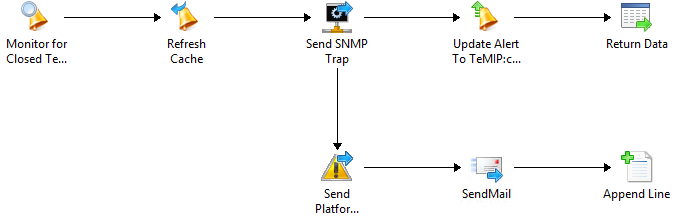
And i've got this runbook on the other side (Orch):

1) Create alerts on the other side :

2) Close alerts on the other side : (If a SCOM Alert gets closed!)

In my case i send a SNMP Trap to my "central" alarm system with specific identifiers, and when i do it i mark the "-CustomField5" as Forwarded just to make sure and let everyone know that my alarm was processed.

If you have any questions, just let me know! :)

Cheers

OpsMgr (SCOM) - Event Views on Web-Console ? Sure!

Well, it's possible! Don't worry!
Just create a new one grid dashboard with a powershell grid widget and paste the following code :
 $Class = Get-SCOMClass -DisplayName 'Windows Server'$Instance = Get-SCOMClassInstance -Class $Class  
 $Events = Get-SCOMEvent -Instance $Instance -EventId 1074 | Sort-Object TimeAdded -Descending | Select -First 50  
 $i = 0  
 foreach ($Event in $Events) { 
 $EventDescription = 'User : ' + [string]$Event.Parameters[6] + ' || Type : ' + [string]$Event.Parameters[4] + ' || Reason : ' + [string]$Event.Parameters[5]  
 $TimeAdded = $Event.TimeAdded  
 $LoggingComputer = [string]$Event.LoggingComputer  
 $dataObject = $ScriptContext.CreateInstance("xsd://foo!bar/baz")  
 $dataObject["Id"]=$i.toString()  
 $dataObject["TimeAdded"]=$TimeAdded  
 $dataObject["LoggingComputer"]=$LoggingComputer  
 $dataObject["Description"]=$EventDescription  
 $ScriptContext.ReturnCollection.Add($dataObject)  
 $i++  
 }  


I've made this for a event collection i've in a customer for restart events (1074) - you might change as you like.
And enjoy the show :)

Monday, November 9, 2015

OpsMgr (SCOM) - CA Certificates Powershell Magic

If you're a SCOM Administrator, you've been through this ...

Create PFX certificates for a couple of hundreds machines that don't belong to any domain you trust, or just belong to workgroup ... So, since i hate to do the same thing more than 2 times i did this :

 $CAName = 'CA-SERVER.DOMAIN\DOMAIN-CA'  
 $CertPassword = 'YourCertificaPassword'  
 $CertTemplate = 'YourCAOpsMgrTemplate'  
   
 Set-Location C:\tmp\SCOM_CERTS\  
   
 foreach ($agent in (Get-Content Agent-List.txt))  
 {  
 Remove-Item ($agent + '.*') -Force  
 $inffile = $agent + '.inf'  
 '[NewRequest]' > $inffile  
 'Subject="CN=' + $agent + '"' >> $inffile  
 'Exportable=TRUE' >> $inffile  
 'KeyLength=1024' >> $inffile  
 'MachineKeySet=TRUE' >> $inffile  
 'FriendlyName="' + $agent + '"' >> $inffile  
 '[RequestAttributes]' >> $inffile  
 'CertificateTemplate="' + $CertTemplate + '"' >> $inffile  
 $reqfile = $agent + '.req'  
 $certfile = $agent + '.cer'  
 $pfxname = $agent + '.pfx'  
 certreq -New $inffile $reqfile  
 certreq -Submit -config $CAName $reqfile $certfile  
 certreq -accept $certfile  
 certutil -exportpfx -p $CertPassword $agent $pfxname "NoChain,NoRoot"  
 certutil -delstore my $agent  
 Remove-Item $inffile,$reqfile,$certfile  
 }  


Have fun! :)

Friday, November 6, 2015

SCCM Missing updates per Collection

Recently a customer had the need to have a simple query/report so they could know which updates (critical and security) were missing in a specific collection in SCCM
So, and i'm not a SCCM database schema expert, googled for an half an hour, and found several queries, but ... not what we needed - so i decided to retrieve the best of each, and put it all in one single query

And came out with this :

 SELECT dbo.v_R_System.Name0 AS 'Computername', dbo.v_UpdateInfo.Title AS 'Updatename', dbo.v_StateNames.StateName, dbo.v_Update_ComplianceStatusAll.LastStatusCheckTime, dbo.v_UpdateInfo.DateLastModified, dbo.v_UpdateInfo.IsDeployed, dbo.v_UpdateInfo.IsSuperseded,  
 dbo.v_UpdateInfo.IsExpired, dbo.v_UpdateInfo.BulletinID, dbo.v_UpdateInfo.ArticleID, dbo.v_UpdateInfo.DateRevised,  
 catinfo.CategoryInstanceName as 'Vendor',  
 catinfo2.CategoryInstanceName as 'UpdateClassification'  
 FROM dbo.v_StateNames  
 INNER JOIN dbo.v_Update_ComplianceStatusAll  
 INNER JOIN dbo.v_R_System ON dbo.v_R_System.ResourceID = dbo.v_Update_ComplianceStatusAll.ResourceID  
 INNER JOIN dbo.v_UpdateInfo ON dbo.v_UpdateInfo.CI_ID = dbo.v_Update_ComplianceStatusAll.CI_ID ON dbo.v_StateNames.StateID = dbo.v_Update_ComplianceStatusAll.Status  
 INNER JOIN v_CICategories_All catall on catall.CI_ID = dbo.v_UpdateInfo.CI_ID  
 INNER JOIN v_CategoryInfo catinfo on catall.CategoryInstance_UniqueID = catinfo.CategoryInstance_UniqueID and catinfo.CategoryTypeName='Company'  
 INNER JOIN v_CICategories_All catall2 on catall2.CI_ID=dbo.v_UpdateInfo.CI_ID  
 INNER JOIN v_CategoryInfo catinfo2 on catall2.CategoryInstance_UniqueID = catinfo2.CategoryInstance_UniqueID and catinfo2.CategoryTypeName='UpdateClassification'  
 WHERE (dbo.v_StateNames.TopicType = 500)  
 AND (dbo.v_StateNames.StateName = 'Update is required')  
 AND (dbo.v_R_System.Name0 IN  
 (SELECT TOP (100) PERCENT SD.Name0 AS 'Machine Name'  
 FROM dbo.v_R_System AS SD INNER JOIN  
 dbo.v_FullCollectionMembership AS FCM ON SD.ResourceID = FCM.ResourceID INNER JOIN  
 dbo.v_Collection AS COL ON FCM.CollectionID = COL.CollectionID LEFT OUTER JOIN  
 dbo.v_R_User AS USR ON SD.User_Name0 = USR.User_Name0 INNER JOIN  
 dbo.v_GS_PC_BIOS AS PCB ON SD.ResourceID = PCB.ResourceID INNER JOIN  
 dbo.v_GS_COMPUTER_SYSTEM AS CS ON SD.ResourceID = CS.ResourceID INNER JOIN  
 dbo.v_RA_System_SMSAssignedSites AS SAS ON SD.ResourceID = SAS.ResourceID  
 WHERE (COL.Name like 'NOS - Patch Management OUT%')))  
 AND ((catinfo2.CategoryInstanceName like 'Critical%' ) OR (catinfo2.CategoryInstanceName like 'Security%' ))  

Result :

I'm not a SQL expert (at all!) so, if you've any other way to get this data, please, feel free to share!
Cheers!