Recently a customer
needed to process 'tons' of snmp traps from several equipments, from several
vendors, and some, snmp v3 traps, these not supported by OpsMgr. But still
forward those alerts to Operations Manager.
So, i built a Nagios
server! Yes Nagios! Nagios, no matter what, can and it's usefull.
And it's helping us
a lot.
I decided to go for
what i like the most - OMD (omdistro.com), so this is made specific for
Check_MK configuration, but you can 'port' it to Nagios Core.
So. Nagios
installed, lot's of equipment configured, snmpd configured, mibs copied, and
tons of traps received, problem solved!
Now, forward those
alerts to SCOM!
My idea (and working
idea!) :
(yes, this was the
powerpoint i sent to the customer! - hahah!)
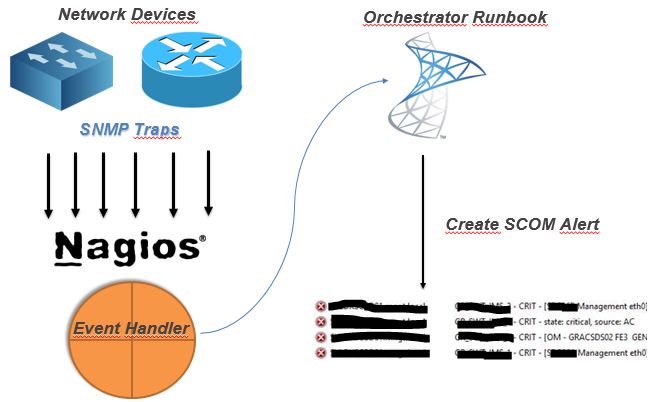
So, after you've
your monitoring criteria in Nagios configured, you need to :
- Create a Orchestrator Runbook that receives some parameters
- Create Nagios Event-Handler to 'consume' that runbook by orchestrator web-service
So, my Orchestrator
Runbook :

Details about the MKAlertInput :


Create Alert details :
So, since i've got
my runbook, i need to make a bash script to consume orchestrator runbook.
But, first, you need
to know :
Your
new runbook ID
And
your runbook parameters ID
How ? Simple !
Connect to your
MSSQL Server (Orchestrator BD) and run this :
 -- Runbook ID
 SELECT
 Name as 'Runbook Name',
 LOWER(ID) as 'Runbook ID'
 FROM [Orchestrator].[Microsoft.SystemCenter.Orchestrator].[Runbooks]
 -- Parameters ID
 SELECT LOWER(Parameters.Id) , Parameters.Name
 FROM [Orchestrator].[Microsoft.SystemCenter.Orchestrator].[RunbookParameters] AS Parameters
 INNER JOIN [Orchestrator].[Microsoft.SystemCenter.Orchestrator].[Runbooks] Runbooks ON Parameters.RunbookId = Runbooks.Id
 -- THIS ID Showld be the one from the first query!
 WHERE Runbooks.Id = '0B3E5FA3-A2E9-4337-BC63-050FC347A908'
Since you got the
ID's you need, you need to create your Nagios Event Handler, so every time
you've na alert you can handle it and forward it to SCOM.
So, my script (for
this scenario!)

#!/bin/sh
# Nagios input data into vars#
host_name="$1"
description="$3"
plugin_output="$3 | $4 @ $5"
last_state_change=`date +"%d-%m-%Y %T"`
servicestate="$2"
# Orchestrator Info #
url='http://ORCHSERVER:81/Orchestrator2012/Orchestrator.svc/Jobs/'
user='DOMAIN\ORCHUSER'
password='ORCHPASSWORD'
case "$servicestate" in
OK)
echo ""
;;
WARNING)
echo ""
;;
CRITICAL)
xml="<?xml version=\"1.0\" encoding=\"utf-8\" standalone=\"yes\"?><entry xmlns:d=\"http://schemas.microsoft.com/ado/2007/08/dataservices\" xmlns:m=\"http://schemas.microsoft.com/ado/2007/08/dataservices/metadata\" xmlns=\"http://www.w3.org/2005/Atom\"><content type=\"application/xml\"><m:properties><d:Parameters><Data><Parameter><Name>host_name</Name><ID>{c2555c8a-4c1c-4c04-a175-d27ccb27aeb3}</ID><Value>$host_name</Value></Parameter><Parameter><Name>description</Name><ID>{e47406b6-fbd7-4bc5-b7a5-a1216f4fdfe5}</ID><Value>$description</Value></Parameter><Parameter><Name>plugin_output</Name><ID>{406620e8-5fc0-4318-ad6b-987d9d491b09}</ID><Value>$plugin_output</Value></Parameter><Parameter><Name>last_state_change</Name><ID>{35ab0932-df75-42d0-9715-935d3510b532}</ID><Value>$last_state_change</Value></Parameter></Data></d:Parameters><d:RunbookId type=\"Edm.Guid\">0b3e5fa3-a2e9-4337-bc63-050fc347a908</d:RunbookId></m:properties></content></entry>"
# XML 2 File
xml_file=`< /dev/urandom tr -dc _A-Z-a-z-0-9 | head -c10`
echo "$xml" > /tmp/$xml_file
# Post data into SCOrch Web-Service
curl --ntlm -u $user:$password -H 'Content-Type:application/atom+xml' -d @/tmp/$xml_file -X POST $url
;;
UNKNOWN)
echo ""
;;
esac
Now, you need to
tell nagios to use this script, so paste this config : (Remember, i'm using Check_MK)
 extra_nagios_conf += r"""
 define command {
   command_name  scorchws
   command_line  /omd/sites/nagdsv/gdc/bin/orchestratorws.sh "$HOSTNAME$" "$SERVICESTATE$" "$SERVICEDESC$" "$SERVICEOUTPUT$" "$HOSTGROUPNAMES$"
 }
 """
 extra_service_conf["event_handler"] = [
   ( "scorchws", ALL_HOSTS, ALL_SERVICES ),
 ]
 extra_service_conf["event_handler_enabled"] = [
   ( "1", ALL_HOSTS, ALL_SERVICES ),
 ]
Everything in place
… this is what you get in SCOM :

Hope this could be
helpful for you :)
Cheers,
