Showing posts with label thirdparty. Show all posts

Monday, April 11, 2016

OpsMgr (SCOM) - Powershell Get Servers in DA

I got this need to upgrade this script ( [SCOM & Orchestrator] - Alert Forwarding ) to include a new CustomField in the alarm properties with the DA name the object belongs to!
So i wondered if somehow was possible to know to which DA a specific server belongs to, and came up with this 'idea' (poweshell script!):

 Import-Module OperationsManager  
 $list = Get-SCOMClass -DisplayName "DA - NAME - HERE" | Get-SCOMClassInstance | %{$_.GetRelatedMonitoringObjects()} | %{$_.GetMonitoringRelationshipObjects()} | select SourceMonitoringObject, TargetMonitoringObject  
 ForEach ($i in $list) {  
     If ( $i.TargetMonitoringObject.DisplayName -eq 'SERVER_FQDN' ) {   
         $DA += $i.SourceMonitoringObject.DisplayName + ' || '  
     }  
}  

Enjoy :)

Thursday, March 31, 2016

OpsMgr (SCOM) - Powershell Event Views Dashboard

I don't like the idea to have lot's of console connecting to my Management Servers, so i give my clients the webconsole link.
But, as you migh know, there's a bunch of limitiations, like "Event Views" don't show up.
So, i had the need to overcome this issue.

Solution was to put Powershell in a SCOM Dashboard.

First, create a new Powershell Grid Layout "Dashboard View" with one cell.
Configure it and paste this code :

 # This example is for a Rule i have for unexpected restart/shutdowns (EventID = 1074)  
 # You can change as you want!  
 $a = Get-SCOMManagementGroup  
 $b = New-Object Microsoft.EnterpriseManagement.Monitoring.MonitoringEventCriteria "RuleId='e7c857e6-7654-5f89-ecdf-8f93325c83ee'"  
 $Events = $a.GetMonitoringEvents($b)  
 $i = 0  
 foreach ($Event in $Events) {  
   $EventDescription = 'User : ' + [string]$Event.Parameters[6] + ' || Type : ' + [string]$Event.Parameters[4] + ' || Reason : ' + [string]$Event.Parameters[5]  
   $TimeAdded = $Event.TimeAdded  
   $LoggingComputer = [string]$Event.LoggingComputer  
   $dataObject = $ScriptContext.CreateInstance("xsd://foo!bar/baz")  
   $dataObject["Id"]=$i.toString()  
   $dataObject["TimeAdded"]=$TimeAdded  
   $dataObject["LoggingComputer"]=$LoggingComputer  
   $dataObject["Description"]=$EventDescription  
   $ScriptContext.ReturnCollection.Add($dataObject)  
   $i++  
 }  

:) Enjoy!

Tuesday, February 16, 2016

[SCOM & Orchestrator] - Alert Forwarding

Let's analyse this scenario:

You want SCOM to forward alerts or open alerts as incidents in a third-party software.

Cons:
SCOM have a limitation when it comes to process alerts;
Only "Notification Pool Members" can manage notifications;
If your channel/subscrition relationship is heavy, you might get a problem - unmanaged alerts.

Pros:
All the Cons! :)

Now, the idea : (Thanks to a PFE friend! MD Thank you!)
What about SCOM just mark the alerts with some kind of tag, and then let Orchestrator listening for that tag, and let Orchestrator do the rest ?
So, for every subscription i've i call a powershell script based channel with this code :
Param([string]$AlertId,[string]$subscriptionID)
Import-Module OperationsManager
$MySubId = $subscriptionID.toString()
$MyAlertId = $AlertID.toString()
$sub = (Get-SCOMNotificationSubscription -Id $MySubId).DisplayName
Get-SCOMAlert -Id $MyAlertId | Set-SCOMAlert -CustomField5 ":waiting" -CustomField6 $sub

On the other hand i've got a channel (command line) based, configured like this :
Full Path of the command line : C:\Windows\system32\WindowsPowerShell\v1.0\powershell.exe
Command line parameters : -Command "& '"C:\OpsMgr\Powershell\Notifications\_OpsMgr_Set-SCOMAlert.ps1"'" -alertID '$Data/Context/DataItem/AlertId$' -subscriptionID '$MPElement$'
Startup folder for the command line : C:\Windows\system32\WindowsPowerShell\v1.0\


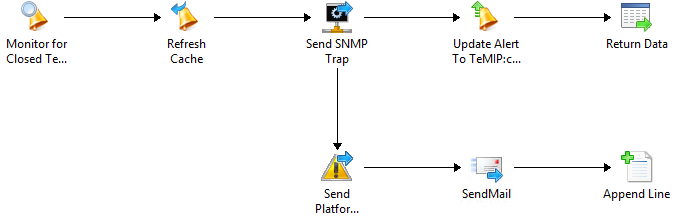
And i've got this runbook on the other side (Orch):

1) Create alerts on the other side :

2) Close alerts on the other side : (If a SCOM Alert gets closed!)

In my case i send a SNMP Trap to my "central" alarm system with specific identifiers, and when i do it i mark the "-CustomField5" as Forwarded just to make sure and let everyone know that my alarm was processed.

If you have any questions, just let me know! :)

Cheers